Spotlight connects to Instagram Business and Creator accounts. Personal accounts can no longer be connected to Spotlight, or to any other Instagram plugin. This is a limitation set by Instagram, not by Spotlight. For more details, see If you have a Personal account below.
Business and Creator accounts are both free “professional” accounts. Creator accounts are meant for public figures, content producers, artists and influencers. Business accounts are meant for brands, shops, local businesses, organizations and service providers. Spotlight works with both. If you’re choosing between them, compare Instagram Creator and Business accounts.
Check your account type
To check whether your Instagram account is Business, Creator, or Personal, follow these steps on a computer, using the Instagram website:
- Open Instagram.com and log in to your account.
- Click More (bottom left) > Settings.
- Scroll down to find the For Professionals section.
Now, check what appears under this section:
BUSINESS
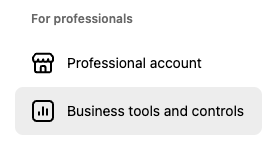
If you see “Business tools and controls,” you have a Business account.
CREATOR
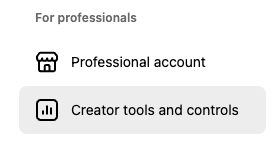
If you see “Creator tools and controls,” you have a Creator account.
PERSONAL
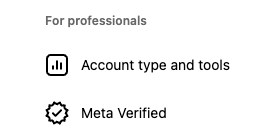
If you see “Account type and tools,” you have a Personal account.
If you have a Personal account
Since December 4, 2024, when Meta shut down the Instagram Basic Display API, Personal accounts can no longer be connected to Spotlight or any other Instagram plugin. To show your Instagram feed on your website, switch to a Creator or Business account. The switch is free.
Note: Creator and Business accounts are always public. Only Personal accounts can be set to private.
How to switch to a Creator or Business account
On Instagram.com, go to More > Settings > Account type and tools and choose Switch to professional account. For the full steps, follow the guide for the account type you want:
- How to switch to an Instagram Creator account
- How to switch to an Instagram Business account (this one also covers linking a Facebook page)
Connect your account to Spotlight
Once you’ve switched, go back to Spotlight and connect your account. If you’re setting up your first feed, click Connect my Instagram account. Otherwise, follow the steps in Connect your Instagram account.
If you connected a Personal account to Spotlight before December 2024, follow the reconnect steps in The End of Instagram Basic Display API to replace the old connection.