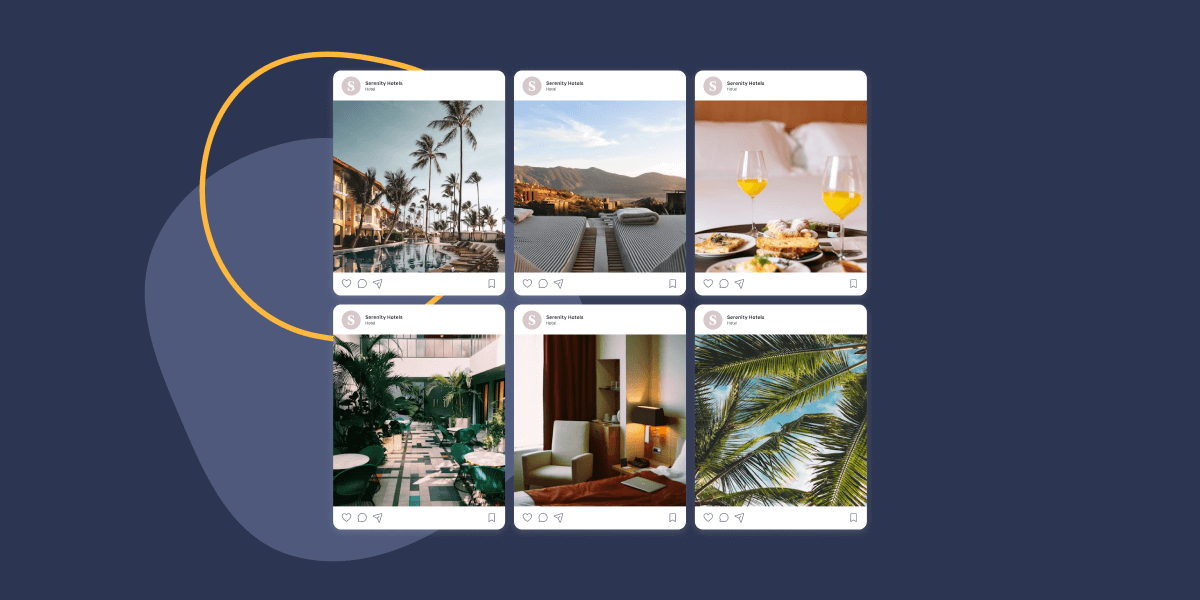
Your hotel’s Instagram looks incredible. Crystal-clear pool shots, golden-hour balcony views, perfectly plated room service. The engagement is solid too: likes, saves, comments from people who clearly want to visit.
So why are most of them still booking through OTAs?
Here’s the math that should bother every hotel marketer: online travel agencies take 15 to 25% commission on every reservation. A $200 room night nets your property roughly $150 after Booking.com or Expedia takes its cut. Meanwhile, 61% of travelers say they’ve booked a hotel after seeing it on Instagram. The audience is there. The intent is there. What’s missing is the bridge between your Instagram content and your own booking engine.
Spotlight builds that bridge. It embeds your Instagram feed directly into your WordPress site with booking-focused features designed for hospitality. Here are 12 strategies hotels are using to turn Instagram followers into direct reservations.
Table of Contents
- Transform Your Instagram Feed Into a Shoppable Room Gallery
- Strategic Feed Placement for Maximum Booking Conversions
- Guest-Generated Content for Social Proof
- Mobile-First Design for Travel Planners on the Go
- Seasonal and Event-Based Feeds for Peak Booking Periods
- Behind-the-Scenes Hospitality Excellence
- Direct Integration with Booking Systems
- Performance Optimization for High-Traffic Periods
- Data-Driven Optimization with Analytics
- Multi-Property Management for Hotel Chains
- Enhanced Guest Experience Through Lightboxes
- Seamless Brand Integration Across Your Site
1. Transform Your Instagram Feed Into a Shoppable Room Gallery
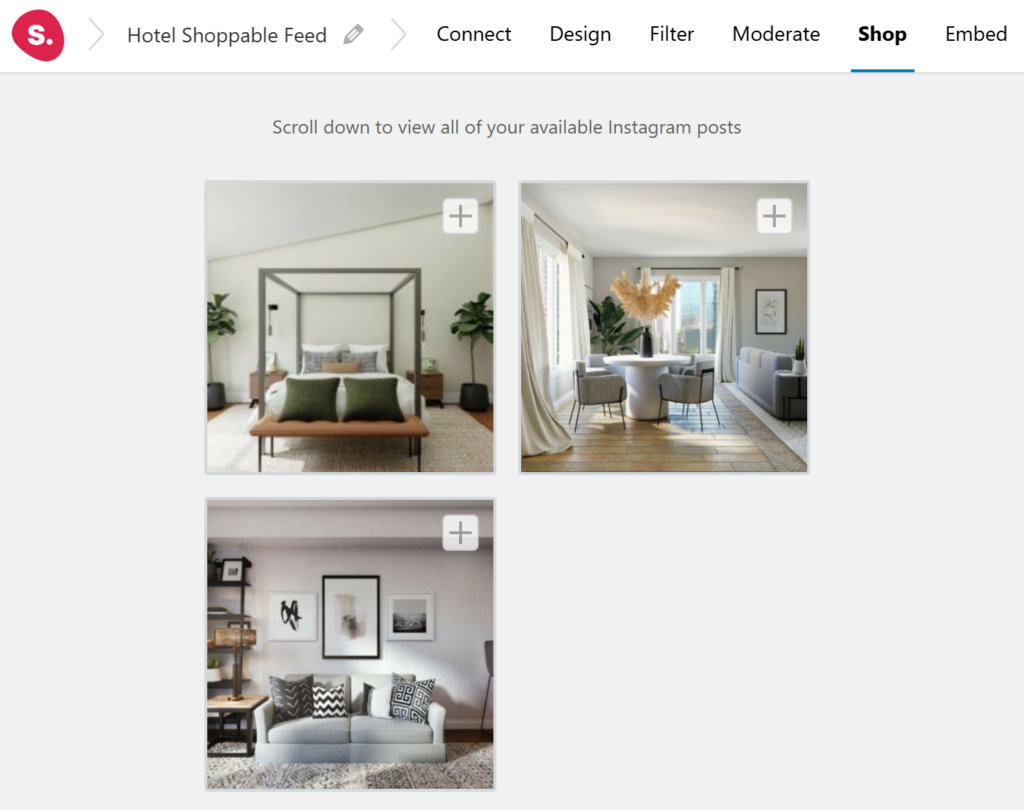
Turn every room photo into a direct path to your reservation system.
What it is: Your Instagram feed becomes a visual room catalog on your website. Each photo of a suite, deluxe room, or penthouse links directly to its booking page. Guests browse your Instagram content and book without ever leaving your site.
Why it works: Hotels already invest heavily in room photography for Instagram. That content sits on a platform you don’t own, generating engagement that goes nowhere. Embedding those same images on your website with booking links captures intent at the moment a guest thinks “I want to stay there.” No commission. No middleman.
How to implement it with Spotlight:
- Use Spotlight’s Promote feature to attach booking links to individual room photos
- Add a global “Book This Room” call-to-action across your entire feed using shoppable feed functionality
- Choose a layout that will let you display room in a flattering aspect ratio, giving vertical shots of grand lobbies and horizontal shots of panoramic views equal space. Spotlight offers a lot of designs to help you showcase feeds
- Customize the feed header with your hotel name and a “Follow Us” button to grow your Instagram audience from your website
Pro Tip: Link your best-performing room types to specific rate pages or packages. If your rooftop suite photos consistently get the most saves on Instagram, that’s your highest-intent audience. Make the booking path from those images as short as possible.
2. Strategic Feed Placement for Maximum Booking Conversions
Where you put your feed matters as much as what’s in it.
What it is: Placing Instagram feeds at specific points in your website’s booking journey: homepage hero sections, individual room pages, the booking confirmation page, and even the “reasons to book direct” landing page.
Why it works: A homepage feed creates an immediate visual impression. A feed on your Deluxe King page shows that specific room type in real-world conditions, not just staged photography. A feed near your booking engine gives hesitant guests one last push of social proof. Each placement has a different job in the conversion funnel.
How to implement it with Spotlight:
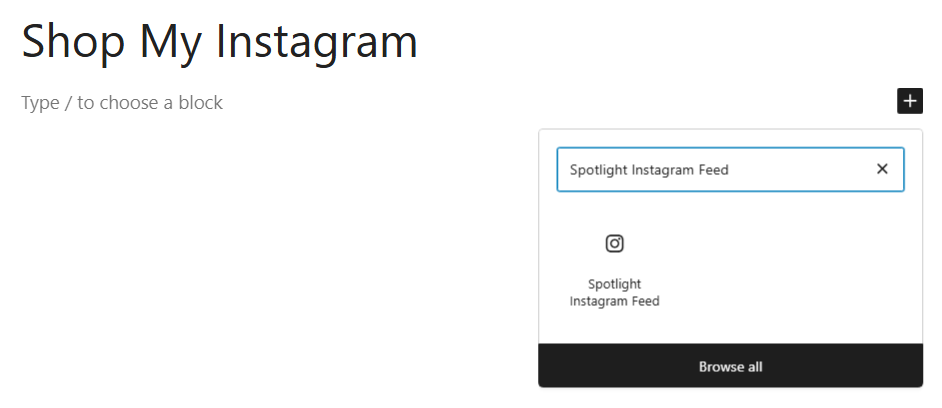
- Embed feeds using Spotlight’s WordPress block, shortcode, or widget, whichever fits your page builder
- Create separate feeds for different placements: a curated highlights feed for your homepage, room-specific feeds filtered by hashtag for individual room pages
- Use the Grid layout for clean, structured room galleries and the Slider layout for homepage carousels
- Add unique Promote links per placement so homepage feeds link to your best-value package while room page feeds link to that specific room’s booking page
Pro Tip: Test a feed on your “Book Direct” landing page. When guests compare your rates against OTAs, seeing fresh Instagram content of real guest experiences can tip the decision toward booking with you. That’s the moment where social proof earns its keep.
3. Guest-Generated Content for Social Proof
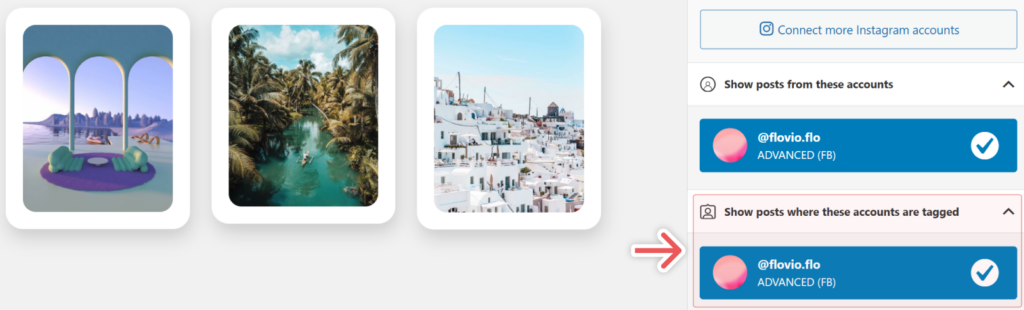
Let your guests sell your rooms for you.
What it is: A tagged post feed that automatically pulls in Instagram photos where guests have tagged your hotel. Combine it with a branded hashtag feed (like #StayAtTheLinden or #SunsetAtHotelVista) and you have a self-updating wall of genuine guest experiences.
Why it works: 81% of travelers read reviews before booking accommodations, and they read an average of nine reviews before making a decision. Guest photos on Instagram carry the same trust signal as written reviews, but they’re visual and immediate. A tagged photo of someone genuinely enjoying your rooftop bar does more for bookings than any copywriter could.
How to implement it with Spotlight:
- Create a tagged posts feed using Spotlight PRO to capture every guest mention automatically
- Enable moderation to review posts before they go live on your site, filtering out anything off-brand or low quality
- Build a separate hashtag feed for your branded hashtag and display it on your homepage or a dedicated “Guest Experiences” page
- Use filtering options to keep the feed focused on content that represents your property accurately
Pro Tip: Print your branded hashtag on room key cards, table tents at your restaurant, and your in-room compendium. The easier you make it for guests to tag you, the more content your feed generates. Some hotels see a 3x increase in tagged posts just by adding the hashtag to their WiFi login page.
4. Mobile-First Design for Travel Planners on the Go
Over half your future guests are booking from their phones. Design for that.
What it is: Using Spotlight’s device-specific responsive settings to ensure your Instagram feeds look flawless on smartphones, where over 50% of hotel bookings now happen and where 83% of travelers research their trips.
Why it works: Mobile hotel bookings are projected to reach 75% market share by 2026. A feed that looks stunning on desktop but loads slowly or displays awkwardly on mobile is actively costing you reservations. The traveler scrolling through hotel options on their phone during a lunch break will book with whoever makes it easiest.
How to implement it with Spotlight:
- Use Spotlight’s device-specific preview to check your feed on desktop, tablet, and mobile before publishing
- Adjust columns per device: 4 on desktop, 2 on tablet, 1 on mobile for clean, full-width room photos
- Ensure all booking CTAs and Promote buttons are large enough to tap comfortably on touchscreens
- Set mobile feeds to show fewer posts initially with a “Load More” button to keep page speed fast on cellular connections
Pro Tip: On mobile, vertical images of hotel interiors naturally fill the screen and create an immersive browsing experience. Prioritize portrait-orientation content in your Instagram strategy, and your mobile feed will feel like flipping through a boutique hotel magazine.
5. Seasonal and Event-Based Feeds for Peak Booking Periods
Match your website content to what travelers are searching for right now.
What it is: Using hashtag feeds to automatically surface seasonal and event-specific content. #WinterGetaway shows your fireplace lounge and spa treatments in December. #SummerPoolside highlights your pool and outdoor dining in July. Your website updates itself as the seasons change.
Why it works: Hotel demand follows predictable seasonal patterns, and travelers search with seasonal intent. Someone looking for a “fall weekend getaway” in September should land on a website showing autumn foliage from your terrace, not leftover summer pool photos. Matching your visual content to the booking season signals relevance and current availability.
How to implement it with Spotlight:
- Create seasonal hashtags for your Instagram posts: #HotelVistaWinter, #HotelVistaPoolSeason, #HotelVistaHolidays
- Build dedicated feeds for each season using hashtag filtering in Spotlight PRO
- Rotate these feeds on your homepage or landing pages to match the current booking season
- Use the Promote feature to attach season-specific packages (“Winter Spa Escape, from $299/night”) to each seasonal feed
Pro Tip: Start your seasonal content rotation six to eight weeks before peak booking periods. Travelers planning a ski trip in February are searching and booking in November and December. Your website should already be showing snow-covered property shots by then.
6. Showcase Behind-the-Scenes Hospitality Excellence
Show guests the care that goes into their stay before they arrive.
What it is: Embedding behind-the-scenes Instagram content showing your team in action: chefs prepping breakfast service, housekeeping perfecting turndown, bartenders crafting signature cocktails, the grounds crew maintaining gardens. The operational excellence guests don’t normally see.
Why it works: Hotels charging premium rates need to justify the price difference over budget alternatives. Behind-the-scenes content demonstrates the human investment behind every stay. When a potential guest sees your pastry chef hand-decorating welcome amenities at 5 AM, they understand why your rate includes more than just a bed. This builds trust for premium pricing in a way that staged photos never will.
How to implement it with Spotlight:
- Use the Slider layout to create a scrollable carousel of behind-the-scenes moments
- Filter content using a dedicated hashtag like #BehindTheScenes[Hotel] to keep this feed focused
- Place BTS feeds on your About page, team page, or alongside your premium room listings
- Include video content showing staff interactions, kitchen tours, and room preparation processes
Pro Tip: Feature individual team members by name when appropriate. “Chef Maria’s signature lavender creme brulee” resonates more than “our restaurant offers fine dining.” Hospitality is personal, and guests book personal experiences.
7. Direct Integration with Booking Systems and Reservation Platforms
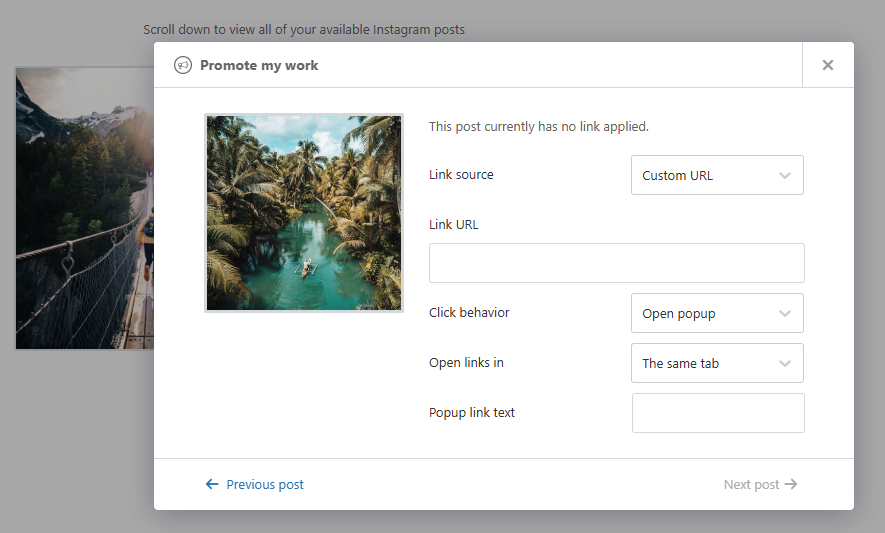
Every beautiful photo should be one click away from a confirmed reservation.
What it is: Using Spotlight’s Promote feature to connect every Instagram post to your booking engine, whether that’s a built-in WordPress system, a third-party platform like Cloudbeds or SiteMinder, or your property management system’s web booking module.
Why it works: Direct reservations average $162 ADR, outperforming OTA rates consistently. And 18% of travelers who start searching on OTAs now convert to direct bookings when given a compelling reason. Every extra click between “I love this hotel” and “I just booked” is a chance for that guest to bounce back to Expedia. Spotlight eliminates those clicks.
How to implement it with Spotlight:
- Use the Promote feature to add a “Book Direct” button to every post in your feed, linking to your booking engine
- Create individual promotions for specific posts: a suite photo links to the suite booking page, a restaurant shot links to your dining reservation system
- Set up a Link in Bio page as a mini booking directory, with each Instagram post linking to its relevant reservation or information page
- Test the complete journey from feed to confirmed booking on both desktop and mobile
Pro Tip: Add rate comparison messaging near your Spotlight feed. “Book direct and save 15%” next to a gorgeous Instagram feed of your property gives guests both the emotional pull and the rational justification to skip the OTA.
8. Performance Optimization for High-Traffic Periods
Your website can’t afford to slow down when everyone’s trying to book.
What it is: Spotlight’s built-in caching, lazy loading, and image optimization features that keep your Instagram feeds loading fast, even during peak traffic periods when half your city is searching for hotel rooms.
Why it works: Peak booking periods bring traffic spikes. A conference announcement, a local festival, a holiday weekend: suddenly your website has 10x the normal visitors. If your Instagram feed slows your page load by even two seconds, you’ll lose a meaningful percentage of potential bookings. Google’s data shows 53% of mobile visitors abandon sites that take longer than three seconds to load.
How to implement it with Spotlight:
- Enable Spotlight’s built-in caching to reduce API calls and serve feed content faster
- Turn on lazy loading so Instagram images only load as guests scroll to them, keeping initial page load snappy
- Use optimized image sizing, Spotlight automatically serves appropriately sized images rather than full-resolution files
- Check your page speed with Spotlight’s performance-optimized feed settings enabled versus disabled
Pro Tip: Run a page speed test during your property’s busiest booking period last year, then compare it after implementing Spotlight’s optimization features. The numbers will tell you exactly how much faster your pages load and how that impacts bounce rates.
9. Data-Driven Optimization Using Spotlight Analytics
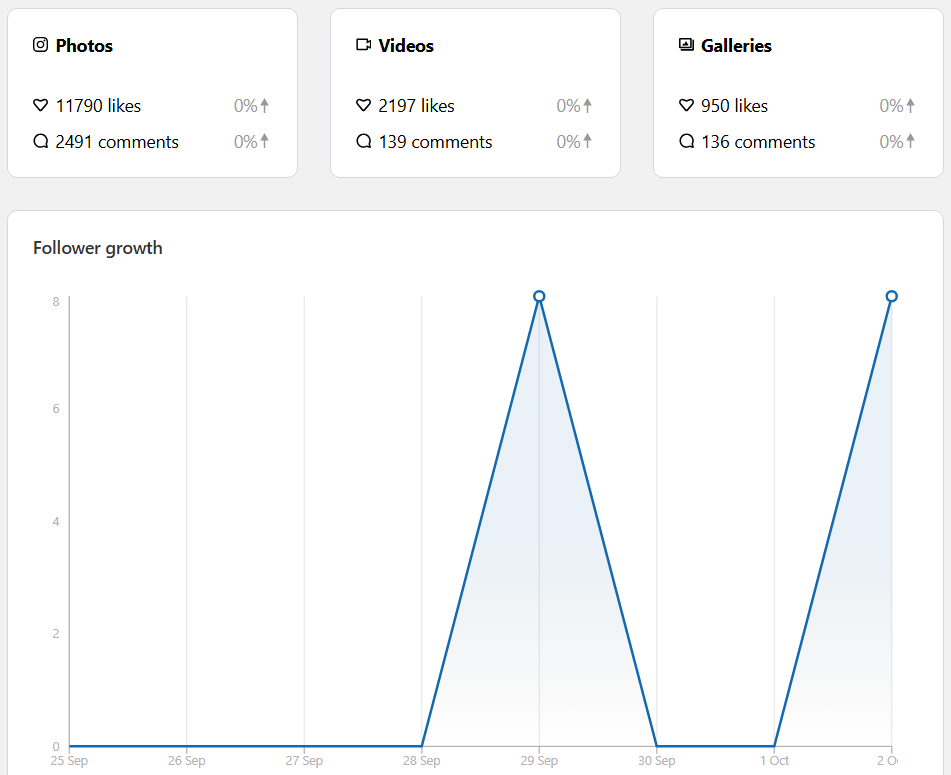
Stop guessing which content drives bookings. Start measuring it.
What it is: Using Spotlight’s built-in analytics to track which room types, amenities, and property features generate the most engagement on your website, then adjusting your content and pricing strategy based on real data.
Why it works: Your Instagram analytics tell you what gets likes. Spotlight’s analytics tell you what gets clicks on your website, where it matters. If your pool photos get massive Instagram engagement but your spa photos drive more booking clicks on your site, that’s insight you can act on. Invest more in spa content. Feature it more prominently. Maybe even adjust your spa package pricing.
How to implement it with Spotlight:
- Enable analytics tracking in your Spotlight dashboard to monitor feed and post performance
- Track which posts generate the most clicks through to your booking engine
- Identify your top-performing content categories: rooms, dining, amenities, events, guest experiences
- Use engagement data to inform your Instagram content calendar and prioritize what your audience actually responds to
Pro Tip: Cross-reference your highest-engagement Spotlight posts with actual reservation data from your PMS. If ocean-view room content drives the most clicks, consider creating a dedicated feed just for that room category with aggressive direct-booking incentives.
10. Multi-Property Management for Hotel Chains and Groups
Run feeds for every property in your portfolio from one WordPress installation.
What it is: Using Spotlight’s unlimited account connections to manage Instagram feeds from multiple hotel properties, each with its own content, branding, and booking links, all from a single WordPress site or across a multisite network.
Why it works: Hotel groups need consistent brand standards with local authenticity. A guest browsing your Miami property’s page should see Miami content linking to Miami rates. They shouldn’t see photos from your Aspen location. Spotlight lets you maintain brand consistency while keeping each property’s feed distinctly local.
How to implement it with Spotlight:
- Connect each property’s Instagram account to Spotlight (unlimited accounts on all plans)
- Create property-specific feeds with individual Promote links pointing to each hotel’s booking engine
- Embed each property’s feed on its corresponding website section or subdomain
- Maintain consistent layout and design settings across properties while allowing local content to shine
Pro Tip: Create a portfolio-level feed on your group’s main website that pulls content from all properties. Use it as a visual directory where each post links to the specific property page. Guests exploring your brand can discover all your locations through a single, dynamic feed.
11. Enhanced Guest Experience Through Interactive Lightboxes
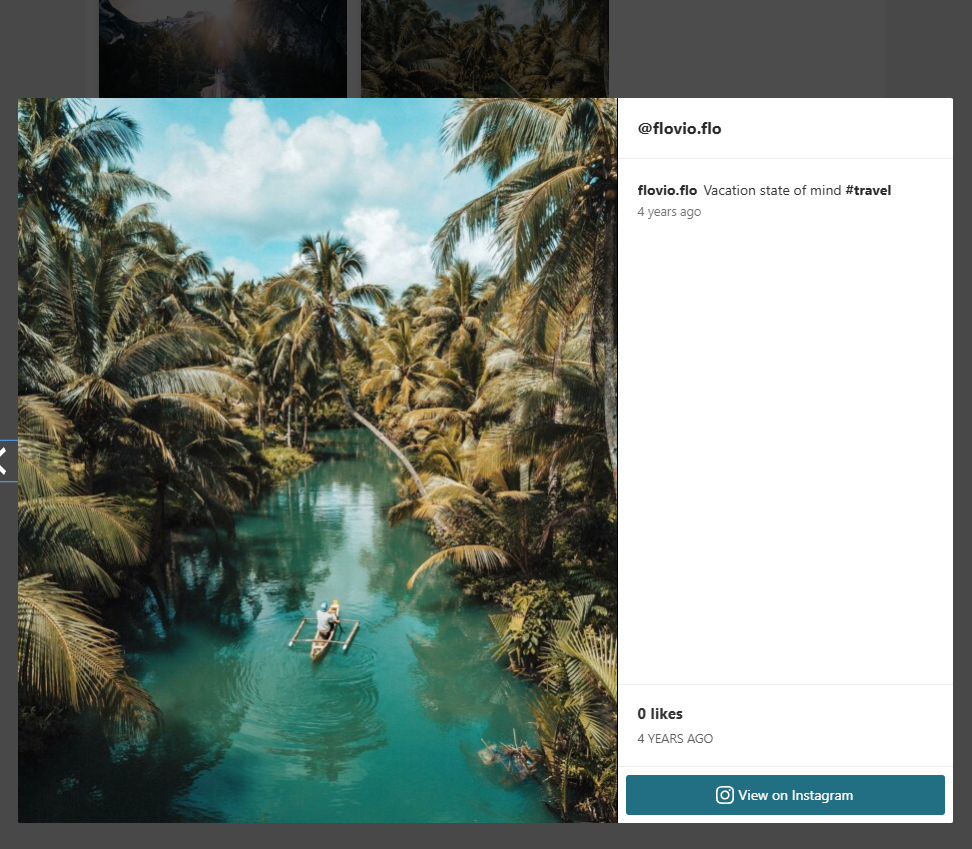
Give potential guests an immersive preview of their stay.
What it is: Spotlight’s lightbox feature opens Instagram photos and videos in a full-screen overlay, letting visitors browse your property in detail. Include video content for virtual room tours, restaurant walkthroughs, and amenity showcases without sending guests off your website to Instagram.
Why it works: Travel decisions are emotional. A small thumbnail of your infinity pool is informative. That same photo expanded to full screen with your caption describing the sunset view is persuasive. Lightbox browsing keeps guests engaged on your site longer, and time on site correlates directly with booking likelihood.
How to implement it with Spotlight:
- Enable lightbox mode in your Spotlight feed settings to let visitors expand photos and videos to full screen
- Include video content in your Instagram strategy: room tours, time-lapses of sunrise views, short clips of live music nights
- Add Promote links inside the lightbox view so guests can book directly from the expanded image
- Write detailed Instagram captions that read well in lightbox mode, including room details, rates, and seasonal availability
Pro Tip: Create a virtual tour experience by posting a series of Instagram photos and videos walking through your property: lobby, rooms, restaurant, pool, spa. When guests browse these in Spotlight’s lightbox, it feels like a self-guided tour that ends with a booking button.
12. Seamless Brand Integration Across Your WordPress Site
Your Instagram feed should look like part of your hotel’s website, not an afterthought bolted on.
What it is: Using Spotlight’s extensive customization options, custom CSS, color matching, template selection, and page builder integrations, to make your Instagram feed match your hotel’s existing design language perfectly.
Why it works: Luxury and boutique hotels invest heavily in their website design. A generic-looking Instagram widget undermines that investment and creates visual friction. When your feed’s styling matches your brand colors, typography approach, and overall aesthetic, it feels native to the experience. Guests stay immersed in your brand from the first scroll to the booking confirmation.
How to implement it with Spotlight:
- Match feed colors, borders, and spacing to your hotel’s brand guidelines using Spotlight’s visual customization options
- Choose from multiple layout templates (Grid, Masonry, Slider) to match the design pattern of each page
- Use Spotlight’s native integration with Elementor, Gutenberg, and other WordPress page builders for precise placement
- Apply custom CSS for advanced styling needs like hover effects that match your site’s interaction patterns
Pro Tip: Create different feed designs for different pages. A minimal, borderless grid might work on your homepage, while a warmer, more detailed Masonry layout suits your “Rooms & Suites” page. Spotlight lets you create unlimited feeds, so each page can have its own tailored version.
Your Instagram Feed Is Your New Front Desk
Every hotel has an Instagram presence. Most are using it to generate likes on a platform they don’t own, for an audience they can’t convert. The gap between social engagement and direct revenue doesn’t have to exist.
Spotlight gives you the tools to close that gap. With 40+ design customizations, built-in booking link promotions, guest content feeds, and analytics that actually tell you what’s working, you can turn passive scrollers into confirmed guests.
These strategies aren’t theoretical. Hotels using these approaches are reducing their OTA dependency by meeting guests where they already spend their time: on Instagram. You can see how other businesses are using Spotlight to drive real results.
Ready to get started? Try Spotlight’s free version to see how your feed looks on your site. When you’re ready for hashtag feeds, tagged post moderation, and advanced booking promotions, upgrade to PRO.
Your Instagram feed is already doing the hard work of making your property look irresistible. Make sure it’s also working to fill your rooms, on your terms, at your rates.
Have questions about setting up Instagram feeds for your hotel or resort? Drop them in the comments below.