
If your feed isn't updating automatically, one potential cause could be the absence of the spotlight/instagram/update hook in the Cron Events list. This issue may occur if the chosen cron interval is unavailable on your website.
To investigate this, it's recommended to install the WP Crontrol plugin. This plugin enables you to inspect your cron jobs directly from the WordPress admin dashboard. After installation, you can navigate to Tools > Cron Events to view your scheduled tasks. From the Cron Events page, initiate a search using the term "spotlight".
Under normal circumstances, there should be four hooks visible in the Cron Events:
spotlight/instagram/update
spotlight/instagram/clean_up_media
fs_data_sync_spotlight-social-photo-feeds
spotlight/instagram/refresh_access_tokens
To resolve this issue, proceed to Instagram Feeds > Settings > Configuration. Within the Import section, adjust the Update Interval. After making the change, click the Save button to apply it.
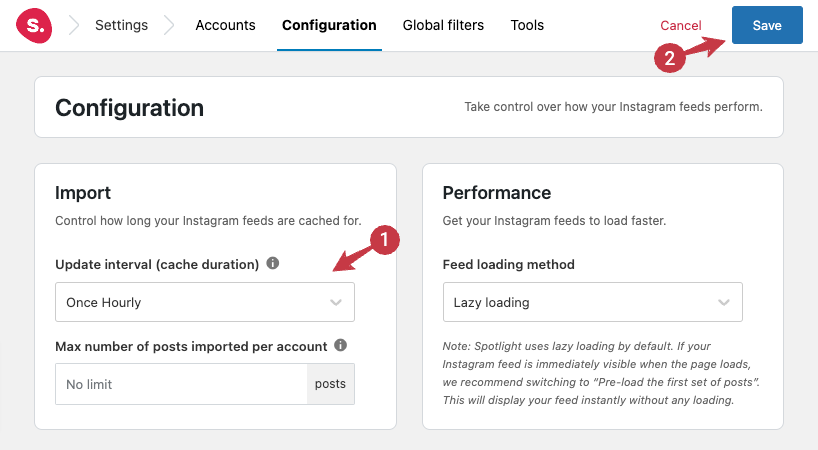
To confirm the modifications, save your adjustments and then revisit WP Crontrol via Tools > Cron Events. Search for the term "spotlight". When the changes have been correctly applied, you should see 4 hooks.

However, if spotlight/instagram/update is still absent, consider altering the update interval to a different option until you locate an interval supported by your website. Most websites generally support and provide the "Once Hourly" option, making it a safe first alternative to try.
