Your Instagram is doing the heavy lifting for your photography business. Beautiful work, consistent posting, solid engagement. But how many of those likes actually turn into booked sessions?
If you’re running a photography studio with a WordPress website, you’ve probably noticed the disconnect. Potential clients scroll through your work, admire your lighting, maybe save a few posts for inspiration, and then… nothing. They never make it to your booking page.
The fix isn’t posting more content or chasing algorithm trends. It’s creating a direct path from your Instagram presence to your website’s booking system.
Spotlight makes this possible by embedding your Instagram feed directly into your WordPress site with features built for businesses that rely on bookings. Here are 15 strategies photography studios can use to turn Instagram browsers into scheduled sessions.
Table of Contents
- Transform Your Instagram Feed Into an Interactive Portfolio
- Automate Client Testimonials Through Tagged Posts
- Create Session-Specific Feeds That Convert
- Build Trust with Behind-the-Scenes Content
- Master Seasonal Photography Campaign Management
- Showcase Your Studio Spaces Strategically
- Connect Instagram Directly to Your Booking System
- Manage Multiple Studio Locations Without the Headache
- Optimize for Mobile-First Client Discovery
- Boost Local SEO with Instagram + Blog Integration
- Turn Photo Styles Into Package Promotions
- Educate Clients Through Visual Content
- Let Social Proof Build Itself
- Track What Actually Works
- Automate Your Marketing Workflow
1. Transform Your Instagram Feed Into an Interactive Portfolio
Turn your Instagram content into a living portfolio with direct booking capabilities.
What it is: Instead of static gallery pages that need manual updates, your Instagram feed becomes a dynamic showcase of your latest work. Every image can include a call-to-action button.
Why it works: Clients see your most recent sessions immediately, which builds confidence in your current style and availability. When someone loves a particular portrait style, they can book a similar session without hunting for your contact page. Fewer clicks means fewer drop-offs.
How to implement it with Spotlight:
- Use Spotlight’s Promote feature to add booking links to individual portfolio pieces
- Use the Promote feature to add a “Book Your Session” call-to-action to every post in your feed
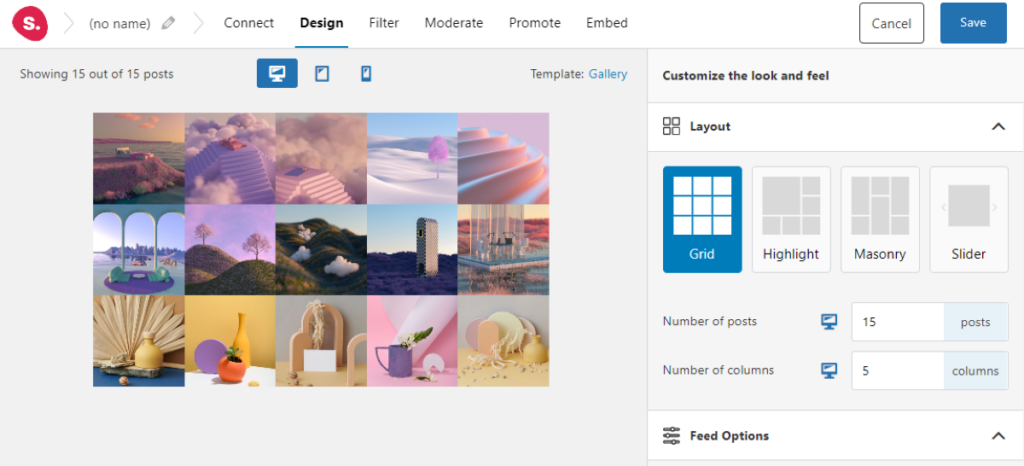
- Choose the Masonry layout to display images in their original aspect ratios, preserving the integrity of both vertical portraits and horizontal landscapes
- Customize the feed header with your studio name and a prominent “Follow on Instagram” button to grow your audience simultaneously
Pro Tip: Create urgency-driven links like “Book Your Holiday Session” or “Limited Spring Availability” to encourage immediate action rather than passive browsing.
2. Automate Client Testimonials Through Tagged Posts
Display authentic client photos and reactions without lifting a finger.
What it is: A tagged post feed that automatically pulls in Instagram posts where clients have tagged your studio. Think of it as a real-time testimonial wall that updates itself.
Why it works: User-generated content carries more weight than anything you post yourself. When potential clients see real people sharing their session photos and tagging your studio with genuine excitement, that builds credibility you can’t manufacture. And this social proof updates itself as satisfied clients share their experiences.
How to implement it with Spotlight:
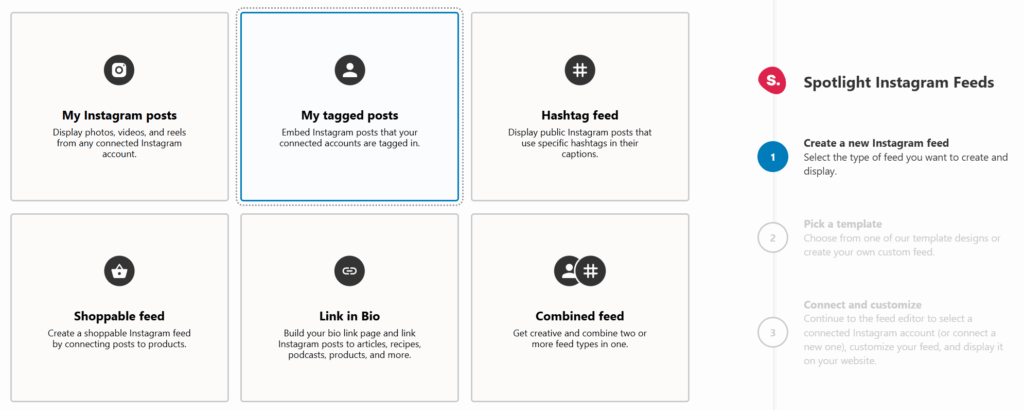
- Create a dedicated tagged posts feed using Spotlight PRO
- Enable moderation to review posts before they appear on your site (filtering out anything off-brand or low-quality)
- Add this feed to your testimonials page or embed it alongside your portfolio
- Use the filtering options to exclude posts that don’t meet your quality standards
Pro Tip: Encourage clients to tag your studio by mentioning it during session delivery. Consider creating a branded hashtag like #ShotBy[YourStudio] and displaying it in your studio space.
3. Create Session-Specific Feeds That Convert
Segment your work into targeted galleries with relevant booking links.
What it is: Separate Instagram feeds for different photography specialties: portraits, weddings, commercial work, newborn sessions. Each feed has its own calls-to-action leading to specific service pages.
Why it works: A bride searching for wedding photographers doesn’t want to scroll through corporate headshots. Session-specific feeds show potential clients exactly what they came for and direct them to the right booking or inquiry form.
How to implement it with Spotlight:
- Create multiple feeds using hashtag filtering to segment content by session type
- Use hashtags like #[YourStudio]Weddings, #[YourStudio]Portraits, or #[YourStudio]Commercial when posting to Instagram
- Link each feed to its corresponding service page or booking form using the Promote feature
- Embed these targeted feeds on the relevant service pages of your website
Pro Tip: Match the design of each feed to its audience. Wedding galleries might use a softer color scheme, while commercial feeds could feature a more minimal, professional aesthetic.
4. Build Trust with Behind-the-Scenes Content
Show the human side of your studio to connect with potential clients.
What it is: Embedding Instagram Stories and casual behind-the-scenes posts that reveal your studio setup, lighting techniques, and the personality behind the camera.
Why it works: Booking a photo session is personal. Clients want to know who they’ll be spending an hour with (or several hours, depending on the session). Behind-the-scenes content humanizes your brand, makes camera-shy clients feel more comfortable, and demonstrates your expertise without feeling like a sales pitch.
How to implement it with Spotlight:
- Create a dedicated feed filtered to show behind-the-scenes content using specific hashtags
- Use the Slider layout to create a carousel of BTS content that visitors can browse
- Place this feed on your About page or alongside your main portfolio
- Include videos showing your lighting setup, equipment, or a typical session in progress
Pro Tip: Film quick clips of happy moments during sessions (with client permission) showing genuine reactions and comfortable interactions. These moments sell sessions better than any posed portfolio shot.
5. Master Seasonal Photography Campaign Management
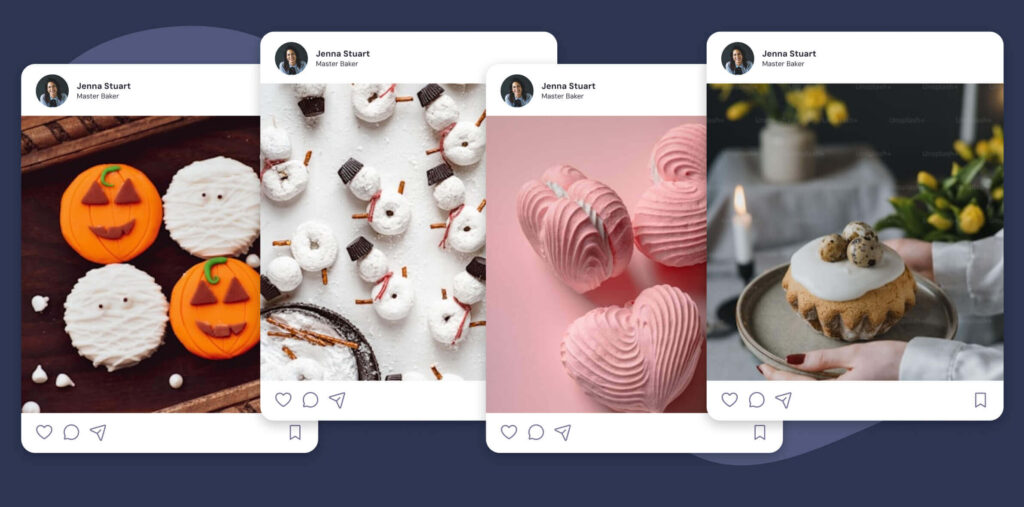
Capitalize on seasonal demand with timely, targeted content displays.
What it is: Using hashtag feeds to automatically display relevant seasonal content: holiday mini-sessions, graduation photos, fall family portraits, wedding season highlights. Your website updates itself as the seasons change.
Why it works: Photography demand follows predictable seasonal patterns. When potential clients visit your site during graduation season, showing them recent graduation portraits immediately demonstrates relevance and current availability.
How to implement it with Spotlight:
- Create seasonal hashtags for your Instagram posts: #[YourStudio]Holiday2025, #[YourStudio]GradSeason, #[YourStudio]FallPortraits
- Build dedicated feeds for each season using hashtag filtering
- Schedule these feeds to appear on your homepage or relevant landing pages during peak booking periods
- Use the Promote feature to add season-specific booking links across your feed
Pro Tip: Start displaying seasonal content two to three months before peak booking periods. In our experience, families booking holiday card sessions in October need to see your autumn and holiday work by September at the latest.
6. Showcase Your Studio Spaces Strategically
Help clients visualize their sessions before they book.
What it is: Dedicated feeds showing your different studio setups, backdrops, and shooting environments so clients can choose their preferred aesthetic.
Why it works: Clients often arrive unsure of what look they want. By showcasing your available spaces and setups on your website, you help them make decisions before the session. Less uncertainty on the day means better sessions and happier clients.
How to implement it with Spotlight:
- Create separate feeds for each studio space or backdrop style
- Use descriptive hashtags when posting: #[YourStudio]WhiteBackdrop, #[YourStudio]NaturalLight, #[YourStudio]DarkMoody
- Embed these feeds on a dedicated “Our Studio” page
- Link each space to relevant packages or a booking form with pre-selected options
Pro Tip: Include before-and-after shots showing the raw studio space alongside finished portraits. This demonstrates your ability to transform any setting into a polished final product.
7. Connect Instagram Directly to Your Booking System
Create a straight line from “I love this photo” to “I just booked a session.”
What it is: Using Spotlight’s Promote feature to add direct links from Instagram posts to your booking calendar, contact forms, or scheduling software like Acuity or Calendly.
Why it works: Every click between seeing your work and booking a session is a chance for potential clients to abandon the process. Direct links eliminate those extra steps and let you capture interest when it’s at its highest.
How to implement it with Spotlight:
- Use the Promote feature to add a “Book Now” button to every post in your feed
- Create individual promotions for specific posts linking to relevant booking pages
- Use the Link in Bio feature to create a custom landing page mirroring your Instagram grid with clickable booking links
- Test the user journey from feed to booking to ensure a smooth experience
Pro Tip: Track which posts generate the most booking clicks using Spotlight’s analytics. Double down on creating similar content that drives conversions.
8. Manage Multiple Studio Locations Without the Headache
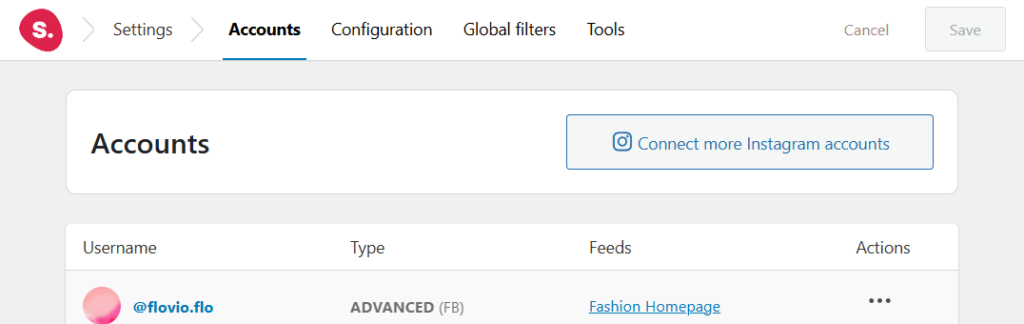
Maintain distinct online presences for each location without multiplying your workload.
What it is: Using Spotlight’s unlimited account connections and multiple feed capabilities to manage Instagram content from different studio locations, each with location-specific booking systems.
Why it works: Multi-location photography businesses need to show relevant content to local audiences. A client looking at your downtown location should see that studio’s work and book with that team. They shouldn’t get confused by content from your other locations across town.
How to implement it with Spotlight:
- Connect multiple Instagram accounts to Spotlight (unlimited accounts included in all plans)
- Create separate feeds for each location
- Embed location-specific feeds on corresponding location pages
- Set up distinct Promotions linking to each location’s booking system
Pro Tip: Maintain consistent branding across locations while highlighting each studio’s unique personality and specialty through location-specific hashtags.
9. Optimize for Mobile-First Client Discovery
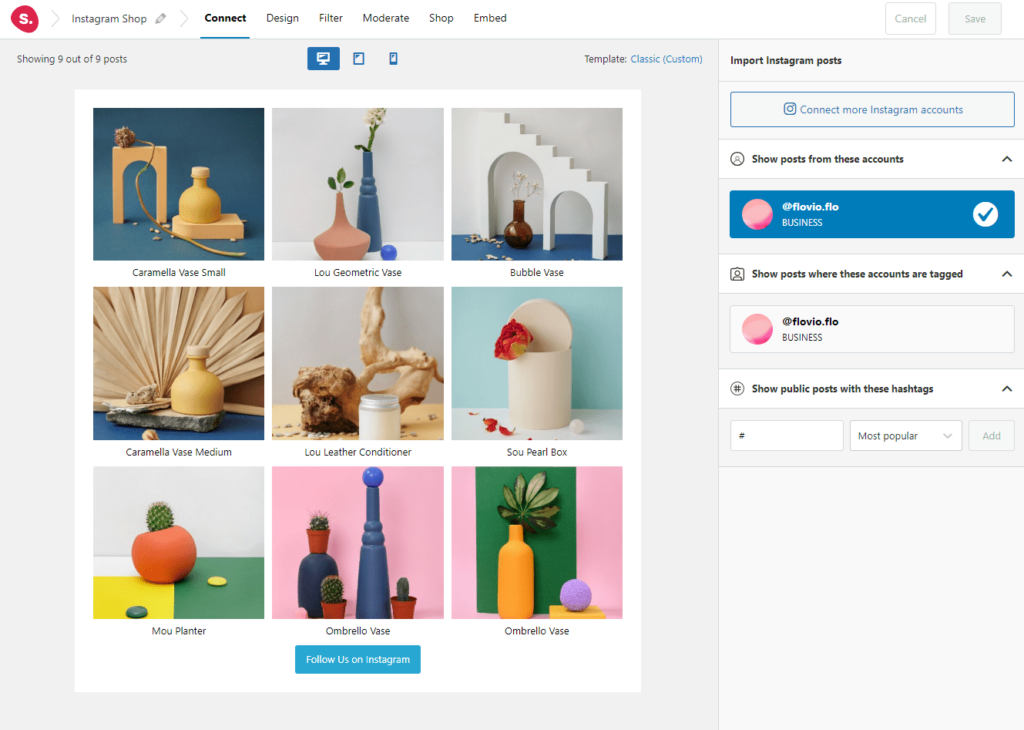
Ensure your Instagram portfolio looks perfect on the devices clients actually use.
What it is: Taking advantage of Spotlight’s fully responsive design options to create feeds that display beautifully on smartphones and tablets, where most potential clients first discover photographers.
Why it works: Most Instagram users access the platform exclusively on mobile devices. If your website’s Instagram integration looks clunky on mobile, you’re losing clients at the exact moment they’re most interested in your work.
How to implement it with Spotlight:
- Use Spotlight’s device-specific preview to check your feed on desktop, tablet, and mobile
- Adjust the number of columns and posts displayed per device (for example, 3 columns on desktop, 2 on tablet, 1 on mobile)
- Ensure booking buttons and CTAs are easily tappable on touchscreens
- Test loading speeds on mobile connections
Pro Tip: On mobile, prioritize vertical images that fill the screen naturally. Set your mobile feed to display fewer posts initially with a prominent “Load More” button to maintain fast page speeds.
10. Boost Local SEO with Instagram + Blog Integration
Combine fresh social content with strategic blogging for better search visibility.
What it is: Embedding Instagram feeds within blog posts about local photography topics to keep content fresh and improve search engine rankings.
Why it works: Search engines favor websites with regularly updated content. By embedding your Instagram feed within blog posts, you’re adding dynamic visual content that updates automatically. This keeps pages fresh without constant manual updates and sends valuable local signals to search engines.
How to implement it with Spotlight:
- Write location-specific blog posts (“Best Senior Portrait Locations in [Your City]”)
- Embed relevant Instagram feeds showing sessions at those locations
- Use Spotlight’s automatic alt-text generation from captions for SEO benefits
- Include location-based keywords in your feed’s surrounding content
Pro Tip: Create cornerstone content pieces for each photography service you offer. Embed relevant feeds that automatically update as you shoot new sessions. These important pages stay current without you lifting a finger.
11. Turn Photo Styles Into Package Promotions
Link specific aesthetic styles directly to corresponding service offerings.
What it is: Creating feeds organized by photography style (classic, editorial, lifestyle, moody) and linking each to packages that match that aesthetic.
Why it works: Clients often know what style they want before they understand photography packages. By connecting visual styles to service offerings, you guide clients toward the right package while they browse inspiring images.
How to implement it with Spotlight:
- Tag Instagram posts with style-specific hashtags: #[YourStudio]Editorial, #[YourStudio]LifestylePortraits
- Create shoppable-style feeds where each image links to a relevant package page
- Use individual post promotions to highlight premium packages alongside premium work
- Add a clear CTA explaining what package includes sessions in that style
Pro Tip: Create a “Style Quiz” page with embedded feeds for each aesthetic. Let potential clients browse styles and self-select into the package that matches their vision.
12. Educate Clients Through Visual Content
Prepare clients for successful sessions through visual guides.
What it is: Using Instagram feeds to display client preparation content, outfit suggestions, location previews, and what-to-expect guides that help clients arrive ready for their best session.
Why it works: Prepared clients have better sessions. By showing outfit inspiration, makeup tips, and location previews through your Instagram feed, you reduce client anxiety and improve session outcomes. It also shows you know what you’re doing (which never hurts when someone is about to spend money on your services).
How to implement it with Spotlight:
- Create educational content hashtags: #[YourStudio]WhatToWear, #[YourStudio]PrepTips
- Build a feed specifically for client preparation resources
- Embed this feed on your booking confirmation page or in pre-session email sequences
- Include posts showing successful outfit choices and location options
Pro Tip: After clients book, send them a link to your preparation page with embedded Instagram inspiration. This builds excitement while ensuring they arrive ready for a great session.
13. Let Social Proof Build Itself
Build credibility through authentic client engagement.
What it is: Displaying feeds that combine tagged posts, client testimonials, and high-engagement content to demonstrate social proof without manual curation.
Why it works: Potential clients trust other clients. When they see real people tagging your studio, commenting on your work, and sharing their session photos, that validates your quality more effectively than any marketing copy you could write.
How to implement it with Spotlight:
- Set up a tagged posts feed to capture client shares automatically
- Use moderation tools to filter content for quality and brand alignment
- Display engagement metrics through Spotlight’s analytics
- Combine multiple feed types on your testimonials page for a complete picture of client satisfaction
Pro Tip: Create a “wall of love” page combining your best client-tagged photos, testimonials, and high-performing posts. Spotlight handles the automatic updates while you manually feature standout client experiences.
14. Track What Actually Works
Understand which content drives bookings and adjust accordingly.
What it is: Using Spotlight’s built-in analytics to monitor feed performance, track which images generate the most engagement, and figure out what content actually converts browsers into booked clients.
Why it works: Not all content performs equally. By tracking which images, styles, and session types generate the most website engagement, you can adjust both your Instagram strategy and your service offerings based on real client interest. The numbers will show you what’s working.
How to implement it with Spotlight:
- Enable analytics in Spotlight’s premium plans to track feed and post performance
- Monitor which posts generate the most clicks through to booking pages
- Identify top-performing content styles and session types
- Use insights to guide future content creation and service development
Pro Tip: Cross-reference your highest-performing Instagram posts with actual booking data. If moody portraits get the most engagement but classic poses book more sessions, adjust your content strategy accordingly.
15. Automate Your Marketing Workflow
Set up systems that work while you focus on photography.
What it is: Creating automated content systems using Spotlight’s features that keep your website fresh and optimized for conversions without daily manual updates.
Why it works: Photographers should spend time behind the camera, not managing website content. Automated systems keep your online presence current while you focus on what you do best. Here’s the thing: you set it up once, and then you get back to shooting.
How to implement it with Spotlight:
- Configure automatic import settings to pull new Instagram posts on a regular schedule
- Set up promotional links that automatically apply to all new content
- Use hashtag-based filtering to automatically route content to appropriate feeds
- Create seasonal feeds in advance that automatically display relevant content
Pro Tip: Build your automation once at the start of each year. Create feeds for each season, set up promotions for recurring booking periods, and let the system run while you focus on your craft.
Start Turning Followers Into Clients
Your Instagram following already includes potential clients. They’ve seen your work, appreciated your style, and thought about booking with you. What’s missing is a clear path from browsing to booking.
Spotlight gives you the tools to build that path. With 40+ design options, built-in promotions, and simple WordPress integration, you can turn passive Instagram scrollers into booked clients.
These strategies aren’t theoretical. Photography studios using these approaches are booking more sessions by meeting clients where they already spend their time: on Instagram. You can see how other businesses are using Spotlight to drive real results.
Ready to get started? Try Spotlight’s free version to see how your feed looks on your site. When you’re ready for hashtag feeds, tagged posts, and advanced promotions, upgrade to PRO.
Do you have questions about setting up Instagram feeds for your photography studio? Let’s talk about them in the comments section below!