
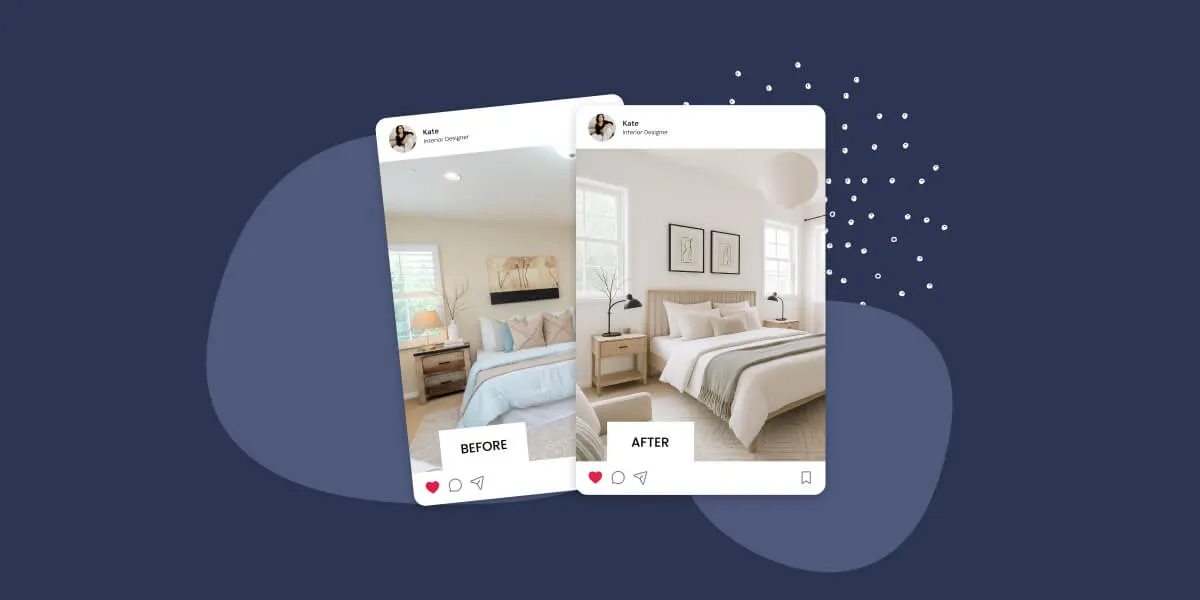
Your Instagram is full off incredible home and room transformations. Followers save your posts, leave heart-eye emojis, and share your work with friends. But somehow, all that engagement isn’t translating into consultation calls or project contracts.
It’s all fugazi.
Here’s the problem: Instagram captures attention, but your WordPress website needs to capture clients. Spotlight bridges that gap by embedding your Instagram portfolio directly into your site and turning every room reveal into a path toward booking your services.
In this article, we’ll cover 12 strategies to make your design portfolio work harder, from creating shoppable room galleries and leveraging client testimonials to optimizing your feeds for mobile visitors and tracking what’s actually converting.
1. Transform Your Instagram Feed into a Shoppable Room Gallery
What it is: Using Spotlight’s Promote features to link design photos directly to booking pages, service offerings, or inquiry forms.
Why it works: Potential clients can act on their inspiration immediately. Instead of admiring a transformation and moving on, they see a clear path to getting the same results for their own home.
How to implement it with Spotlight:
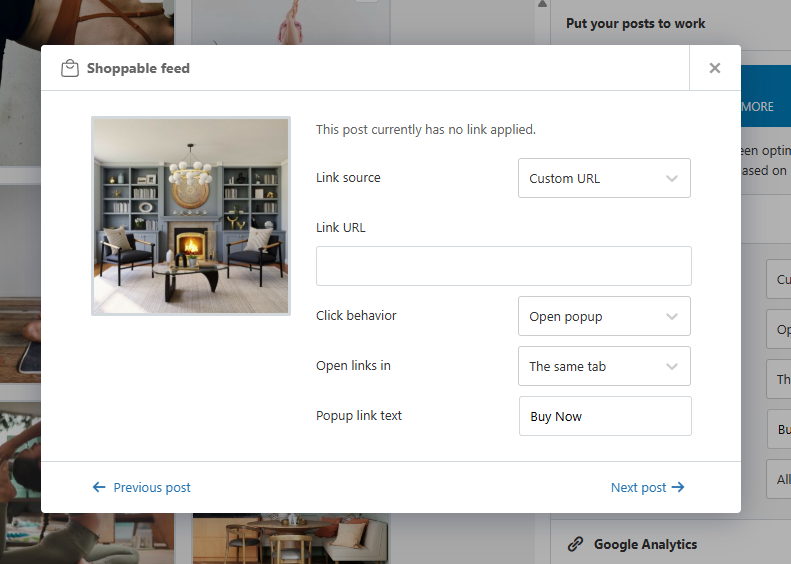
With Spotlight PRO’s shoppable feed functionality, you can map specific Instagram posts to any URL. Here’s how to set it up:
- Navigate to the Promote tab in the feed editor
- Configure where each post links when visitors click on it
- Create service-specific links (kitchen consultations, color consultations, full home design inquiries)
- Set up urgency-driven CTAs for seasonal campaigns
Pro Tip: Link seasonal design posts to time-sensitive offers. A spring refresh campaign becomes more compelling when visitors can book directly from the inspiring image.
2. Strategic Feed Placement for Maximum Conversions
What it is: Using Spotlight’s flexible embedding options to place design feeds where they’ll generate the most bookings.
Why it works: Your Instagram portfolio shouldn’t be hidden in a sidebar or footer where potential clients might miss it. Being able to place feeds where you want ensures your best work will be seen by visitors.
How to implement it with Spotlight:
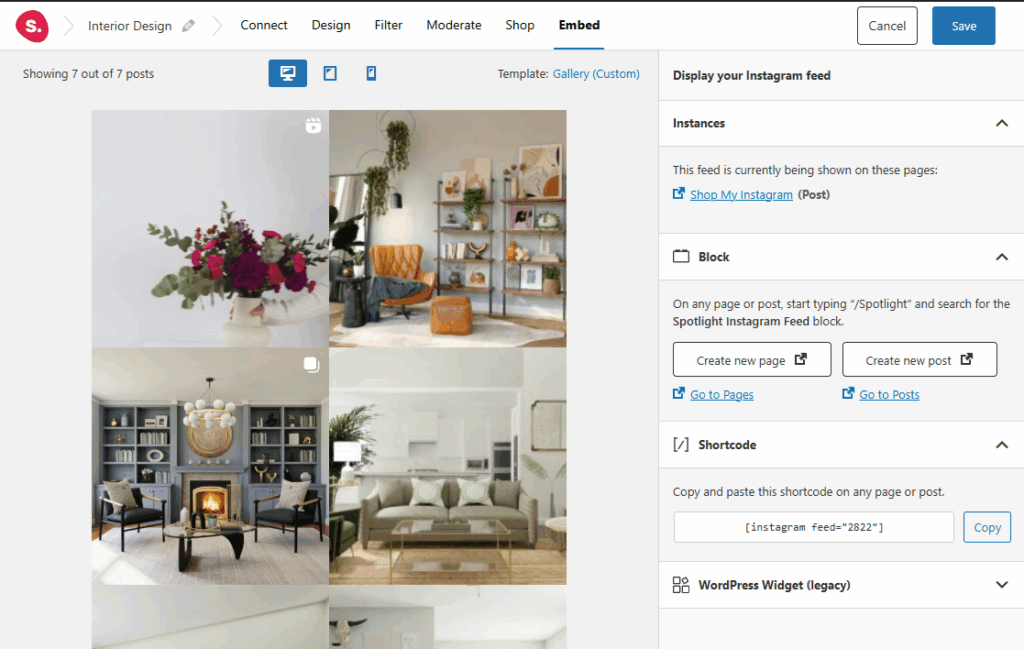
Spotlight offers multiple ways to display your feeds: shortcodes, blocks, widgets, and an Elementor integration for PRO users. This flexibility means you can place feeds where they’ll have the most impact.
Some great options for where to place Instagram feeds on an interior design website include:
- Your homepage hero section to showcase recent transformations
- Service pages to display project photos relevant to each specialty
- Before a CTA, displaying User-Generated Content from happy clients
- On your contact page to build trust right before visitors reach out
Pro Tip: Create multiple feeds with different content for different pages. Spotlight supports unlimited feeds even in the free version, so you can tailor each placement to its context.
3. Let Your Client Transformations Sell Your Services
What it is: Using Tagged post and Hashtag Feed features to showcase client photos of your completed projects.
Why it works: Authentic client photos provide social proof that polished portfolio shots can’t match. When potential clients see real homeowners enjoying spaces you’ve designed, trust builds naturally.
How to implement it with Spotlight:
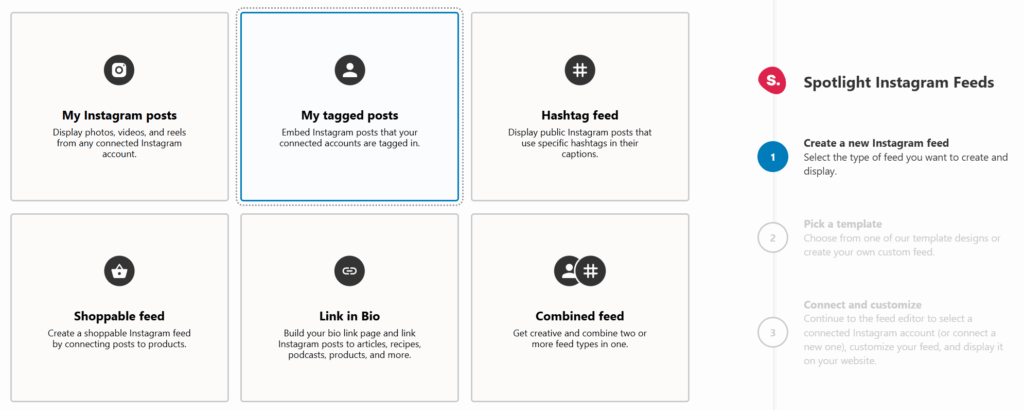
With Spotlight PRO, you can create feeds that display posts where your account has been tagged:
- Create a new feed and select “My tagged posts”
- Spotlight pulls in posts where your Instagram account has been tagged
- Use the Moderate tab to hand-pick which posts appear
- Filter out anything that doesn’t represent your brand well
You can also create branded hashtags like #YourStudioHome and set up hashtag feeds to display content from clients who use them.
Pro Tip: Encourage clients to share photos by offering something valuable in return, like maintenance tips, seasonal styling advice, or a small discount on future services.
4. Mobile-Optimized Galleries That Match Your Brand
What it is: Configuring responsive, on-brand Instagram feeds that look great on any device and integrate seamlessly with your website design.
Why it works: Most homeowners (and most people nowadays) look for design inspiration on their phones. If your portfolio doesn’t look good on mobile or clashes with your site’s aesthetic, you’re losing credibility before visitors even see your work.
How to implement it with Spotlight:
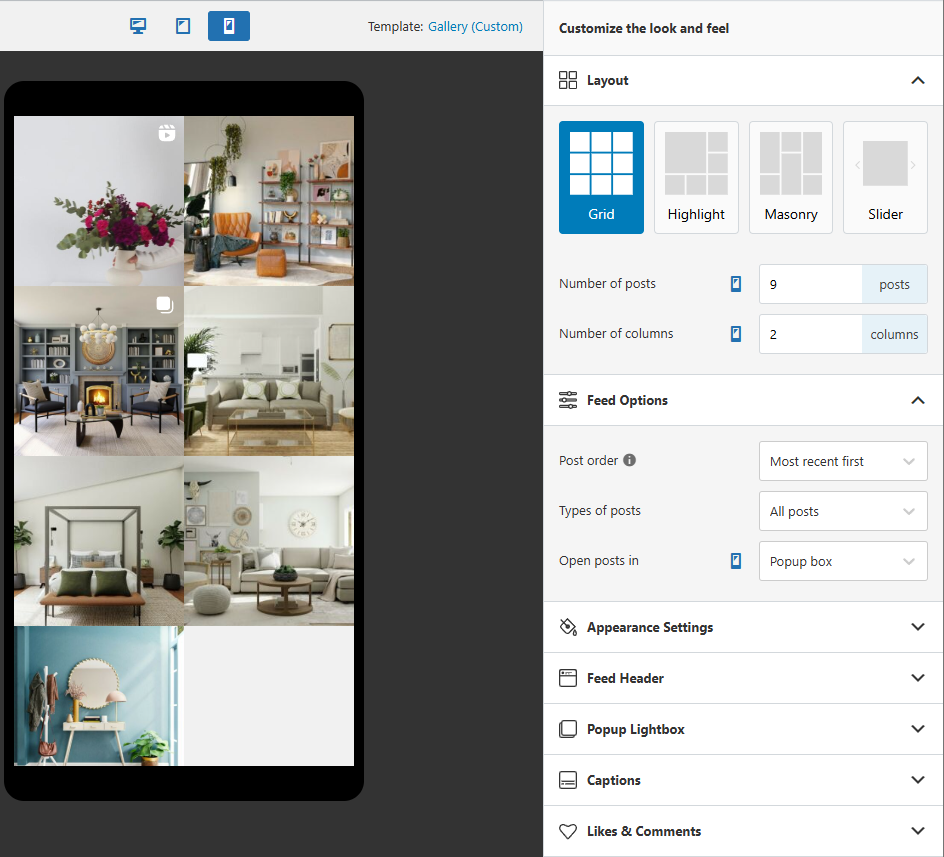
Spotlight feeds are fully responsive, but you can take it further by customizing settings per device:
- Use the preview device option to see how feeds look on desktop, tablet, and phone
- Set different column counts for different screen sizes (3 columns on desktop, 1-2 on mobile are great starting points)
- Configure whether buttons appear on specific devices
- Match colors, spacing, and styling to your website through the Design tab
For Elementor users, Spotlight PRO includes a dedicated widget that lets you design feeds directly within Elementor’s editing experience with live preview.
Pro Tip: Test your entire booking flow on mobile. From Instagram post to consultation scheduling, make sure the experience works smoothly on a phone screen.
5. Behind-the-Process Content for Building Trust
What it is: Displaying behind-the-scenes content that demonstrates your design process and problem-solving skills.
Why it works: Process transparency builds trust and it justifies your pricing. Clients aren’t just paying for a pretty room – they’re paying for your expertise and decision-making.
How to implement it with Spotlight:
Share process content on Instagram, from material selection sessions to space planning sketches, contractor collaboration, and client walkthroughs. Then embed it strategically on your website:
- Create a dedicated “Our Process” page with a feed filtered to behind-the-scenes posts
- Mix process content with finished reveals on service pages
- Use Instagram captions to explain what’s happening in each shot (these appear in Spotlight’s lightbox)
Pro Tip: Document common design challenges and how you solved them. This positions you as a problem-solver, not just a decorator.
6. One-Click Consultation Booking Integration
What it is: Connecting design posts directly to your booking system so visitors can schedule consultations immediately.
Why it works: Fewer clicks between inspiration and action means higher conversion rates. When someone’s excited about a room transformation, you want booking to be effortless.
How to implement it with Spotlight:
With Spotlight PRO’s shoppable feed functionality, you can link posts to any URL:
- Connect room reveals directly to Calendly, Acuity, or your booking system
- Create service-specific booking links so that different content leads to different consultation types
- Link kitchen posts to kitchen consultations, color posts to color consultations, etc.
Pro Tip: Offer virtual consultations with immediate availability. This removes geographic barriers and captures clients who don’t want to wait for an in-person meeting.
7. Analytics-Driven Portfolio Optimization
What it is: Tracking which design posts generate the most engagement and using that data to optimize your content strategy.
Why it works: Instead of guessing what resonates with potential clients, you can see what’s actually working and double down on it.
How to implement it with Spotlight:
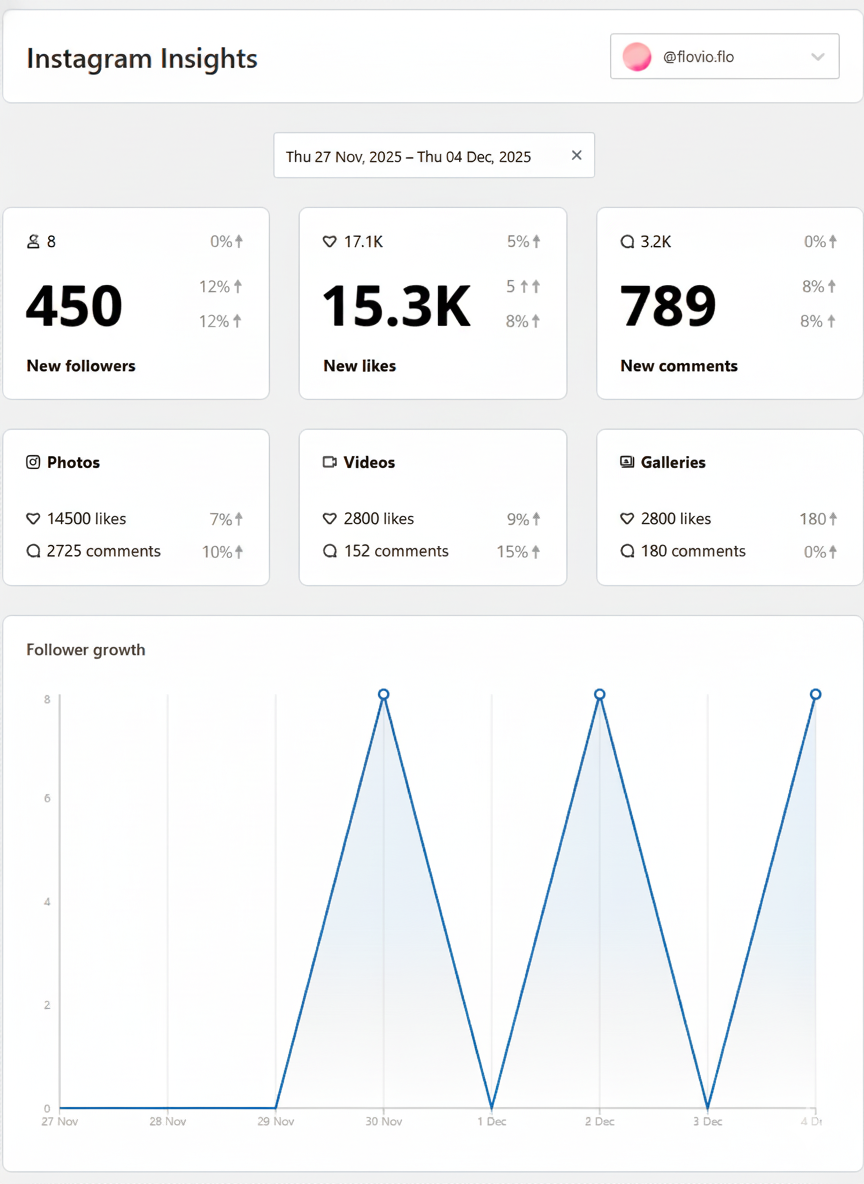
Spotlight’s Analytics features (available with the Agency plan) let you track how visitors interact with your feeds:
- See which posts get the most clicks and engagement
- Identify patterns across design styles – does modern outperform traditional?
- Monitor which room types generate the most interest
- Use this data to inform both Instagram content creation and website feed curation
Pro Tip: High-performing posts should do double duty. Feature them in multiple feeds, use them in blog post case studies, and place them on your highest-traffic pages.
8. Multi-Project Feeds for Diverse Portfolios
What it is: Creating separate feeds for different design specialties, budget levels, or project types.
Why it works: A luxury residential client wants to see different work than someone looking for a budget-friendly refresh. Showing the right work to the right visitor increases conversions.
How to implement it with Spotlight:
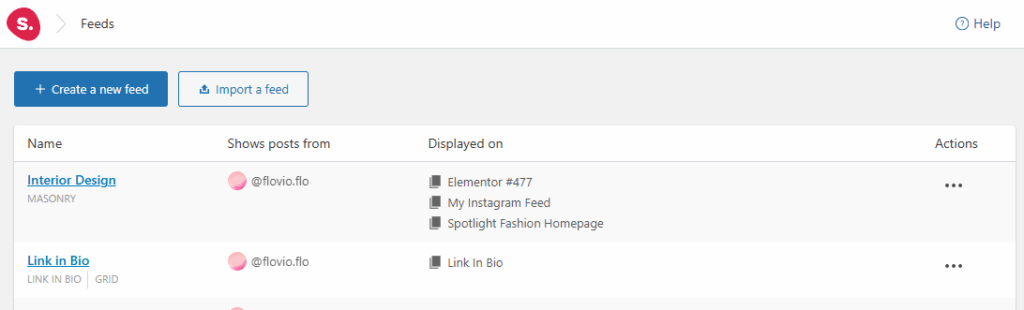
Spotlight supports unlimited feeds, so you can create targeted portfolios:
- Separate feeds by project type (residential vs. commercial)
- Organize by budget level (luxury vs. accessible makeovers)
- Create room-specific feeds (kitchens, living spaces, bedrooms)
- Build style-focused feeds (modern, traditional, eclectic)
Use the Filter and Moderate tabs to control exactly which posts appear in each feed, then embed the relevant feed on pages targeting each client type.
Pro Tip: Create landing pages for specific client personas. A “Luxury Kitchen Design” page with curated kitchen content will convert better than a generic portfolio.
9. Lightbox Storytelling for Design Details
What it is: Using popup lightboxes to provide detailed project information when visitors click on posts.
Why it works: A quick scroll through thumbnails doesn’t tell the whole story. Clicking into a post and reading about design challenges, solutions, and results builds confidence in your expertise.
How to implement it with Spotlight:
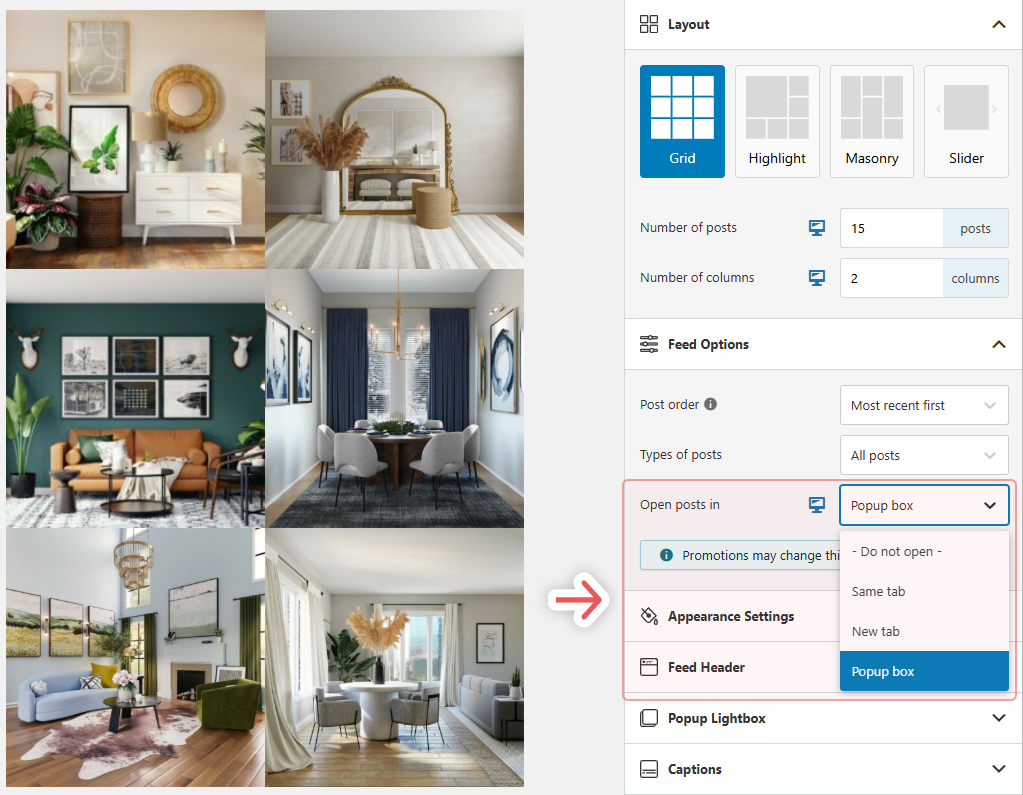
In the Design tab under Feed Options, configure posts to open in a Popup box. This displays the larger image along with your Instagram caption.
Write your Instagram captions with this in mind:
- Include project details and design challenges you overcame
- Mention what made the project successful
- Add context that helps visitors envision working with you
Navigation arrows let visitors browse through multiple posts without closing and reopening the lightbox.
Pro Tip: Use captions to address common client concerns upfront. That can include timelines, unique design approaches, and collaboration styles. This pre-qualifies leads before they reach out.
10. SEO-Optimized Design Content
What it is: Leveraging your Instagram content to improve search visibility for design-related keywords.
Why it works: SEO brings high-intent visitors. These are people actively searching for design services and yours are right there, ready for a new project. Combining your Instagram content with optimized pages can help your business show up for those searches.
How to implement it with Spotlight:
Embed relevant Instagram feeds in blog posts and service pages:
- Write about “Kitchen Design Trends in [Your City]” featuring your latest kitchen work
- Create “Modern Farmhouse Living Room Ideas” posts with relevant Instagram content
- Build project case studies that combine narrative with visual proof
The feeds add fresh, regularly-updated visual content to your pages, which is something search engines value.
Pro Tip: Write detailed project case studies incorporating Instagram content. These can rank for specific design style searches and demonstrate expertise to visitors who find you through search.
11. Automated Fresh Content
What it is: Setting up feeds that stay current automatically without manual updates.
Why it works: Consistent fresh content maintains engagement, but you’re busy running a design business. Automation keeps your website current while you focus on clients.
How to implement it with Spotlight:
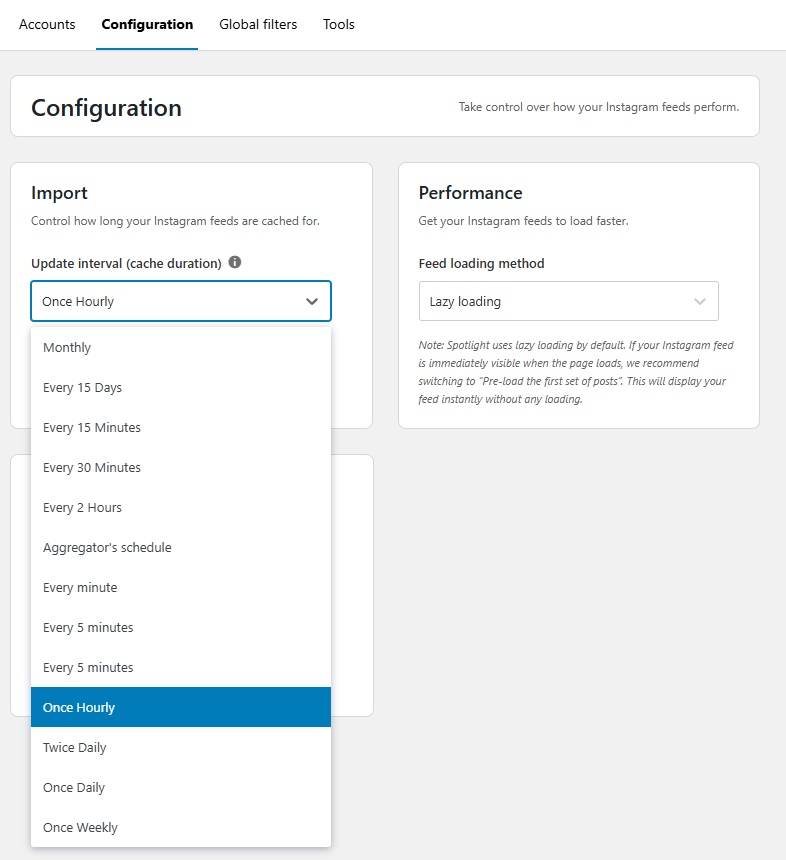
Once you’ve connected your Instagram account and created feeds, Spotlight handles updates automatically:
- Configure update frequency in Settings > Configuration (hourly to weekly)
- New Instagram posts appear on your website without additional work
- Use optimization settings to manage your database and keep things running smoothly
Pro Tip: Batch your Instagram content creation. Shoot and edit multiple projects at once, schedule posts, and let Spotlight handle the website side automatically.
12. Common Feed Pitfalls and How to Fix Them
What it is: Identifying and fixing issues that prevent feeds from converting visitors into clients.
Why it works: Poor implementation, slow loading, generic CTAs, inconsistent branding. All of these undermine the expertise you’re trying to showcase. Spotlight can help you tackle a lot of these issues. Let’s break down how.
Common issues and solutions:
- Slow loading: In Spotlight, enable lazy loading by going to Settings > Configuration and remember not to display too many posts at once. 9-12 often posts work better as a small, self-contained feed rather than giving users too many options to click on.
- Generic CTAs: Replace “Follow us on Instagram” with specific actions like “Book Your Kitchen Consultation” or “See Our Full Portfolio.”
- Inconsistent branding: Spend time in the Design tab matching colors and styling to your website. A feed that looks out of place can lower the trust in your services.
- Outdated content: Check Settings > Configuration in the Spotlight settings to verify your update interval. If feeds aren’t refreshing, clear the cache in Settings > Tools.
Pro Tip: Audit your feed integration from a potential client’s perspective. Click through the entire journey from post to booking and fix any friction points.
Your Instagram Feed Is Your Digital Showroom
These 12 strategies can help your business turn its Instagram presence from a passive portfolio into an active client acquisition system. Using Spotlight, you can connect stunning visuals from Instagram and use them as part of the customer journey on your website. With the right setup, an Instagram post of a successful home makeover can link straight to your consultations page.
Are you read to turn all of those stunning interior design photos on your Instagram account into consultation bookings? Try Spotlight today and start converting more clients directly from your WordPress site.



One Response
Instagram has become a valuable platform for interior designers to connect with clients and showcase their work. The concept of virtual design consultations is particularly useful for expanding services and reaching clients beyond local markets. Great insights!