
Your Instagram is filled with stunning transformations. Overgrown backyards turned into outdoor living spaces. Patchy lawns that became lush green carpets. Cracked patios replaced with hardscaping that makes the neighbors jealous.
But here’s the thing: those beautiful posts sit on Instagram while your phone stays quiet during the slow season. Your best marketing is trapped on a platform where potential clients scroll past in seconds, never making it to your website where they could actually book a consultation.
Here are 15 strategies to turn your Instagram content into consultation requests and booked projects. Let’s get to it!
1. Put Before/After Transformations Where They Convert
What it is: Embedding your dramatic landscape transformations directly on your services pages, right where visitors can see your work and take action.
Why this matters: Homeowners considering a landscaping project want to see what you can actually do. When they see a backyard that looks like theirs transformed into something beautiful, they picture that possibility for their own property. Putting these transformations on your website beats hoping they stumble across your Instagram.
How to set it up:
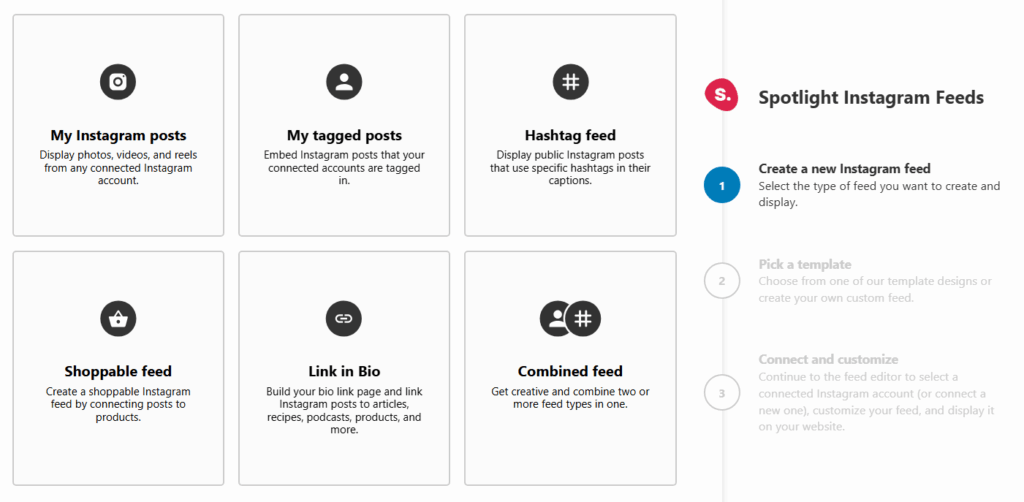
- Create a new feed in Spotlight and select “My Instagram posts” as your feed type
- Choose a template that shows off your work well (Gallery or Portfolio layouts work great)
- Use the Design options to customize how many posts display and match your site’s look
- Copy the shortcode from the Embed step and paste it on your services page above your contact form or use a Spotlight block
Here’s something we’ve found works well: position your before/after feed right above your consultation form. Visitors who’ve just scrolled through proof of your work are ready to take action.
2. Create Season-Specific Galleries That Book Work Months Ahead
What it is: Using hashtag filtering to build dedicated feeds for each seasonal service: spring cleanups, summer installations, fall prep, and winter planning.
Why this matters: Smart homeowners book seasonal services in advance. A fall cleanup gallery displayed in late summer reminds them to schedule before your calendar fills up. Season-specific feeds show that you understand the rhythm of landscape maintenance and can handle their property year-round.
How to set it up:
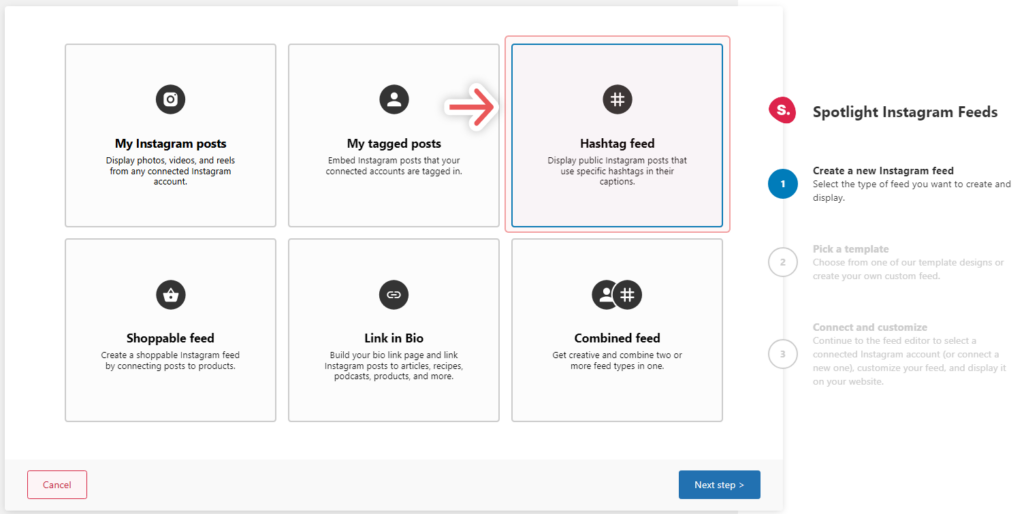
- Develop a consistent hashtag system on Instagram for each service type (#YourCompanySpringCleanup, #YourCompanyFallPrep, etc.)
- Create a Hashtag feed in Spotlight for each seasonal service
- Build dedicated landing pages for each season and embed the matching feed
- Update your navigation seasonally to feature whatever service is most relevant
One thing that helps: create your winter service page during your busy summer months. When things slow down, you’ll have a booking tool ready to capture off-season work.
3. Let Customer Photos Build Your Credibility
What it is: Displaying posts where customers have tagged your business or used your branded hashtag. These authentic testimonials work harder than any sales copy you could write.
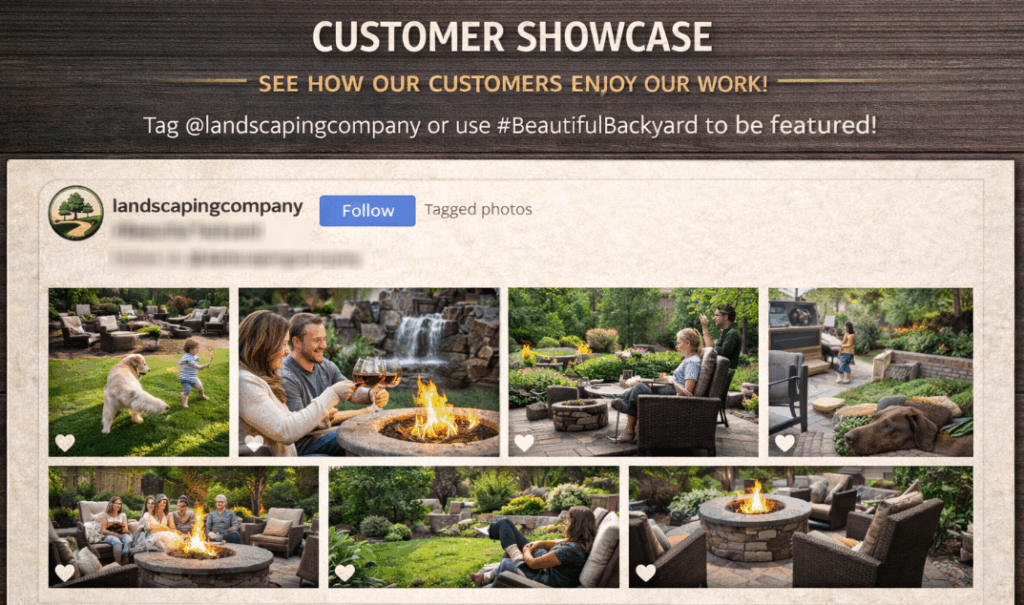
Why this matters: Homeowners trust other homeowners. When they see real customers sharing photos of their landscapes and tagging your company, that’s credibility professional photos alone can’t match. It shows your clients are happy enough to publicly recommend you.
How to set it up:
- Select “My tagged posts” when creating a new feed to show posts where your business has been tagged
- Pick a layout that presents customer content well (Masonry or Grid templates work nicely)
- Place this feed on your testimonials page or give it a section on your homepage
- Ask completed project clients to share photos and tag your business in your project follow-up
4. Match Your Feeds to Visitor Intent
What it is: Positioning different Instagram feeds on specific pages based on what visitors are looking for and where they are in their decision process.
Why this matters: Someone on your patio installation page has different needs than someone browsing lawn care services. Showing them project examples for the specific service they’re researching makes them more likely to request a consultation for that service.
How to set it up:
- Map your website pages to your service categories
- Create separate feeds in Spotlight for each major service, using hashtag filtering to curate relevant content
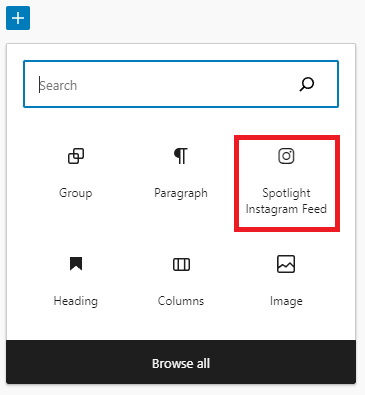
- Embed each service-specific feed on its matching page using the shortcode or blocks
- Track which pages generate the most consultation requests and adjust your feed placement
Your homepage should feature your most impressive recent work. Service pages should show deep expertise in that category. Let each feed serve a distinct purpose.
5. Optimize for Homeowners Researching from Their Backyard
What it is: Configuring your Spotlight feeds with device-specific settings so homeowners researching landscapers from their yard see your work displayed perfectly on their phones.

Why this matters: People often research landscaping services while standing in their yard, staring at the problem they want solved. A feed that looks great on mobile captures these ready-to-buy visitors at their most motivated moment.
How to set it up:
- Open your feed in the Spotlight editor and use the Preview device option to see how it looks on phone, tablet, and desktop
- Adjust the number of posts and columns for each device (maybe a 9-post grid on desktop but 3 posts on mobile)
- Add a Load more button for mobile so visitors can explore more without the initial view overwhelming them
- Test your feeds on actual phones to make sure the experience matches what you expect
6. Build Maintenance Feeds That Generate Recurring Revenue
What it is: Creating feeds that showcase your ongoing maintenance work, positioned to remind existing clients and attract new ones to your recurring service programs.
Why this matters: One-time projects are great, but maintenance contracts provide predictable revenue and keep your crews busy during slower periods. Showing the consistent quality of your maintenance work demonstrates reliability and encourages homeowners to commit to ongoing service.
How to set it up:
- Tag your Instagram maintenance posts consistently (#YourCompanyWeeklyMaintenance, #YourCompanyLawnCare)
- Create a Hashtag feed filtered to show only maintenance content
- Embed this feed on a dedicated maintenance services page that outlines your recurring packages
- Include a clear call-to-action below the feed for scheduling a maintenance consultation
7. Show the People Behind the Work
What it is: Showcasing your team, equipment, and work process through a curated feed that humanizes your business and shows your professionalism.
Why this matters: Homeowners invite landscaping crews onto their property, often when they’re not home. Seeing the faces of your team, the quality of your equipment, and your professional approach builds the trust they need to hand over their house keys and let you work unsupervised.
How to set it up:
- Post behind-the-scenes content regularly on Instagram showing your team in action, your equipment, and your attention to detail
- Use a dedicated hashtag for this content type so you can filter it easily
- Create a feed showcasing this content and place it on your About page or a Meet the Team section
- Try the Slider layout to create an engaging carousel of team and process content
8. Connect Project Galleries to Consultation Booking
What it is: Using Spotlight’s promotion features to add custom calls-to-action that guide visitors from viewing your work to scheduling a consultation.
Why this matters: Beautiful project photos inspire action, but only if visitors know what action to take. Adding clear prompts to book a consultation while they’re engaged with your portfolio removes friction from the process.
How to set it up:
- Go to the Promote tab in your feed editor
- Configure promotional elements that direct visitors to your consultation booking page
- Use language specific to landscaping (“Ready to transform your outdoor space? Schedule your free consultation”)
- Test different messages to see which generates the most requests
9. Use Analytics to Find What Actually Converts
What it is: Monitoring which Instagram posts and feeds generate the most engagement and consultation requests through Spotlight’s analytics.
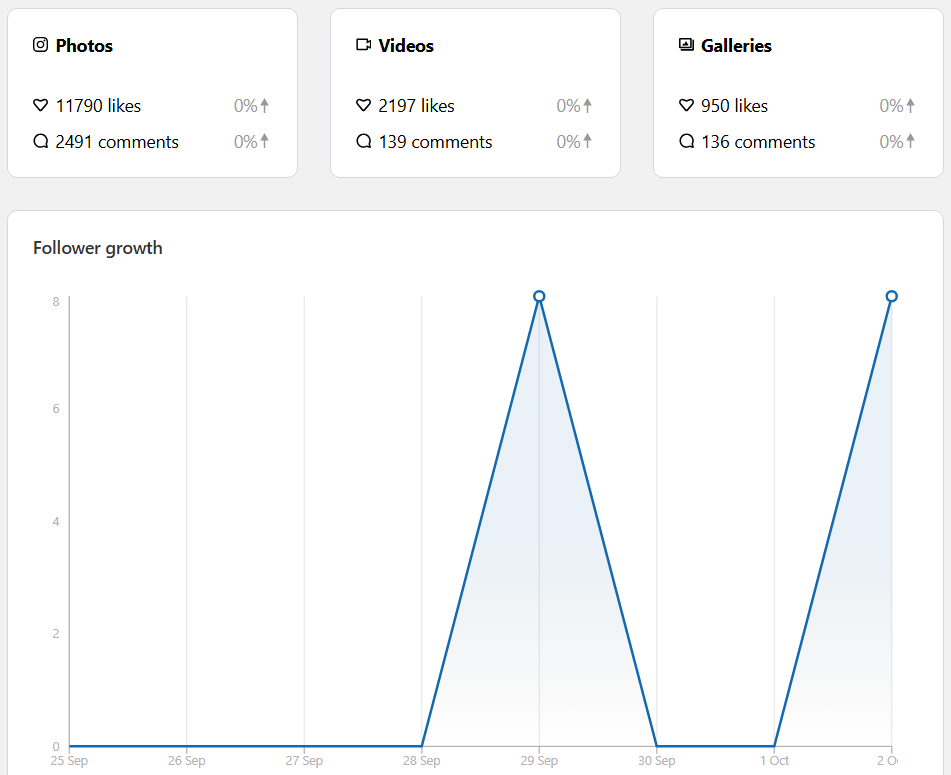
Why this matters: Not all project photos perform equally. Understanding which transformations, service types, or content styles drive the most engagement helps you create more of what works and refine your strategy for better results.
How to set it up:
- Check the Analytics section in your Spotlight dashboard to review feed performance
- Identify which posts get the most interaction when displayed on your website
- Look for patterns: specific project types, angles, or descriptions that perform well
- Apply what you learn to both your Instagram posting and your feed curation
10. Manage Multiple Service Areas Without the Headache
What it is: Creating and organizing separate feeds for different service areas, project types, or business divisions while keeping management simple.
Keep in mind that this takes some upfront planning. You’ll need a consistent hashtag system on Instagram before Spotlight can filter effectively. But once you set it up, it mostly runs itself.
Why this matters: Many landscaping businesses serve multiple areas or offer distinct service divisions. Showing location-specific or service-specific content helps visitors see that you have experience in their area or with their particular needs.
How to set it up:
- Use the Feeds list in Spotlight to organize all your feeds with clear names
- Create location-specific hashtags on Instagram for projects in different areas
- Build matching feeds for each area using hashtag filtering
- Use the Duplicate feed action to quickly create variations of successful configurations
11. Let Visitors Explore Project Details
What it is: Enabling visitors to click on feed images to view larger versions along with captions that provide project details, materials used, or transformation stories.
Why this matters: Homeowners researching landscaping investments want details. What materials did you use? How long did it take? What challenges came up? The lightbox feature lets them explore this information without leaving your website.
How to set it up:
- In your feed’s Design settings, set “Open posts in” to use the Popup box
- Make sure your Instagram captions include relevant project details
- Write captions that answer common questions homeowners have about similar projects
- Include specifics like square footage, timeline, and materials when it makes sense
12. Match Your Feeds to Your Website Design
What it is: Customizing your Spotlight feeds to fit your website’s look, so your Instagram content feels like a natural part of your site rather than something bolted on.
Why this matters: Professional appearance builds confidence. When your Instagram feed matches your website’s colors, fonts, and overall design, it shows you pay attention to details. That’s a quality homeowners want in their landscaper.
How to set it up:
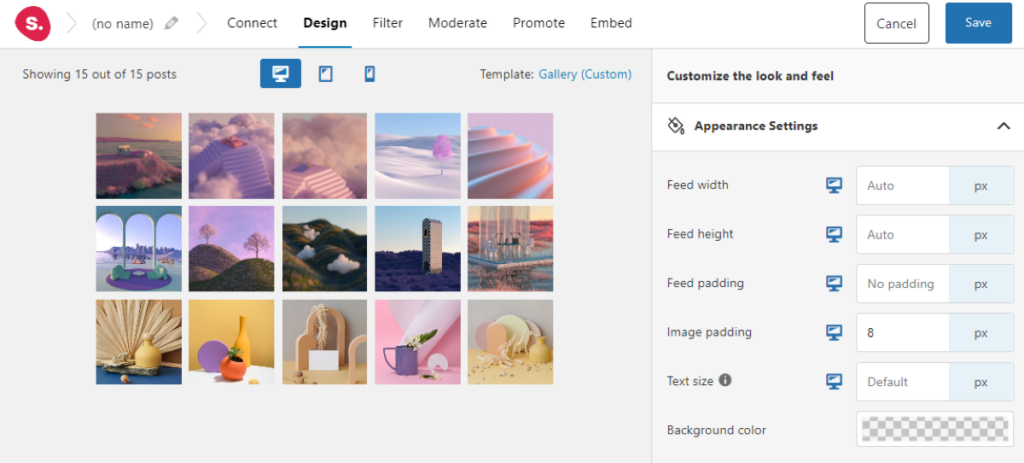
- Use the Appearance section in Design options to customize colors, including the Follow button
- Select a template that fits your website’s existing style
- Adjust header options to match your typography and branding
- If you’re using Elementor, take advantage of Spotlight’s dedicated widget for easy integration
13. Boost Local SEO with Visual Blog Content
What it is: Embedding relevant Instagram feeds within blog posts about landscaping topics, services, or local projects to add value and keep visitors on your site longer.
Why this matters: Blog posts about landscaping topics attract search traffic from homeowners researching solutions. Embedding visual proof of your work within educational posts turns informational content into lead generation while improving the time-on-page metrics search engines reward.
How to set it up:
- Identify your top blog posts or create new content around services you want to promote
- Create feeds filtered to show projects relevant to each post’s topic
- Embed feeds using shortcodes or blocks, placing them at natural break points in the article
- Use the Spotlight Instagram Feed block in the WordPress editor for easy placement
14. Let Seasonal Content Update Automatically
What it is: Configuring Spotlight to automatically import your latest Instagram posts, so your website always shows current, seasonally relevant work without manual updates.
Why this matters: Landscaping is seasonal. Visitors in October want to see fall projects, not summer installations from months ago. Automatic updates keep your website current without requiring you to manually refresh content during your busiest periods.
How to set it up:
- Go to Settings, then Configuration in your Spotlight dashboard
- Set the Update interval to check for new posts at a frequency that matches how often you post
- Configure the maximum posts imported based on your display needs
- Post consistently to Instagram with seasonal content, and it’ll automatically appear on your site
15. Curate Your Best Work (Skip the Rest)
What it is: Using filtering and moderation to ensure only your best, most relevant work appears in your feeds while keeping content that doesn’t serve you off your website.
Why this matters: Not every Instagram post belongs on your professional website. Personal posts, experimental content, or projects that didn’t turn out great can undermine the image you’re building. Smart curation puts your business forward at its best.
How to set it up:
- Open the Filter and Moderate options in your feed editor
- Use filtering to include only posts with specific hashtags that identify portfolio-worthy content
- Review imported posts and hide any that don’t meet your standards
- Create a clear system on Instagram: use specific hashtags for content you want on your website, making filtering simple
The honest truth: this requires discipline in your Instagram posting. Separate portfolio-worthy project posts from casual business updates with consistent hashtags, and the filtering handles itself.
Put Your Best Work Where It Gets Results
These strategies transform your Instagram from passive social media posts into active lead generation. Each one addresses a real challenge landscaping businesses face: converting visual proof of quality work into actual consultations and booked projects.
Whether you start with embedding before/after transformations on your services pages, creating seasonal galleries that book work in advance, or building mobile-optimized feeds for homeowners researching from their backyards, each strategy moves you toward more consistent bookings.
The landscapers who do well through seasonal ups and downs are those who put their best work in front of potential clients when those clients are ready to decide. Your Instagram already has the proof of your expertise. Spotlight puts that proof where it brings in business.
If you’re a WordPress user, try out Spotlight for free. See how it works with your own Instagram content and upgrade when you’re ready.
Do you have questions about using Spotlight for your landscaping business? Have you tried any of these strategies? Let’s talk about them in the comments section below!